
Blog
- Follow me on Micro.Blog
- Follow me on Mastodon (AllThingsTech)
- Follow me on Medium
- Follow me on X / Twitter
- Follow me on Tumblr
- First and foremost, offline access across operating systems (that includes Linux, too).
- Security. Preferably end-to-end encryption.
- Encryption for attachments
- A quality extension for capture, including a Safari extension.
- Sketching capabilities with OCR detection.
- OCR across text, images, handwritten notes and scanned documents.
- A daily note function.
- Backlinks with a list of connected notes.
- Share sheet functionality across the entire Apple ecosystem.
- Calendar integration with Apple Calendars.
- Apple Watch integration, including Siri input for when I am not near a computer.
- Blue for personal endeavours.
- Green for home, including family-related items.
- Yellow for website/blogging.
- Purple for work-related items.
- Grey for side-hustle items like Medium.
- Personal
- As the name suggests, anything to do with me is set to personal. I use the blue that reminds me of the infamous blue bubble in iMessages. My personal tag can be accompanied by the finance or course tags.
- Course
- Anything to do with self-directed learning, college or work-related CPD will be given the course tag. I could rename it learning, but I am always learning, so being direct with the type of learning makes sense to me.
- Finance
- Anything that impacts me financially goes in here. House bills, utilities, car fuel, insurance, etc. I also assign this tag to routine check-ups of my bank and saving accounts. I have recently added planned purchases to the tag.
- Home
- Home is a mixture of home-related chores, specific family members and reminders of where the task needs to be completed (see GTD). I originally had individual tags for my wife, son, and other family members. As you can imagine, the tagging list got overwhelming. Now I make sure the person’s name is in the task title.
- Side hustle (not real name)
- Anything that is earning me money and is not related to my main work will be tagged with side hustle, including anything I sell, like clothing and books. I usually use this tag with another like personal or finance. Reminders to get something prepared, planned or an errand will receive this tag for my side hustle.
- Blog
- My blog tag relates to my blogging, admin and media creation. The finance and side hustle tag can accompany this tag when appropriate. An example of this is paying for subscriptions like my Ulysses or micro.blog access. However, most tasks with the blog tag have something to do with writing a blog post or researching a topic.
- Work
- I was in two minds whether to have subtags with the work tag. I wondered if I should have different areas of my job under this tag. Instead, I use brackets at the end of each work-related task to specify what area it relates to. I chose purple for the tag colour because my workplace colour is purple. This colour stands out against all the other colours because it is bright.
- this is my main Bujo. It is a hardback A6 dotted with 216 pages of 120gsm paper. There are two strips of ribbon to use as bookmarks. The black ribbon stays in the monthly future log and the white ribbon jumps to each day.
- Minimalism
- Digital minimalism/detox
- Mental health
- Journaling / Bullet Journaling
- Applications (including reviews)
- Posts of my app usage.
- Social media
- Fitness/health
- A weekly recap of what I have used, viewed and reviewed.
- They don’t receive security updates like smartphones do. There’s no secure messaging option either, only SMS, which is easily accessible to those who want to gain access to your messages.
- Google and Meta have access to what you use on modern feature phones. If getting away from these tech giants is your concern, then a feature phone is not the answer.
- The web browser on the phones does not have the security features available on modern browsers. Welcome to ad city. Good luck trying to read page without the ads blocking your view.
- Google Maps, Waze, or Apple Maps are brilliant tools to navigate to places unfamiliar. The difficulty with features phones is they have a basic version of Google Maps, which is unless.
- You will spend a lot of time researching your journey instead of actually working on important things (not productive at all).
- Searching for the nearest place to refuel, shop and eat will require you to pre-plan your journey. I would have stacks of Post-Its and notebooks with directions, printouts and snippets to aid me on the journey.
- The apps on features phones are outdated. You will not find anything useful. There were countless times I wanted to take a quick note, add something to my calendar or check an email. I couldn’t. Again, the apps are not available. You will need a pen and notepad, if you remember to bring them with you.
- Phone operating systems like KaiOS are supported by Google and Meta. You will have a phone bloated with their apps. I wanted to get away from them, not have them as the only apps on the phone.
- Ads are everywhere on these devices. I was inundated with ads popping up while navigating the complicated menu system. I even received push ads on the weather and music app.
- Feature phones do not have multitasking available. Some of the phones won’t let copy and paste either.
- Yes. WhatsApp is installed on some feature phones. However, there is limited in functionality. It is a lightweight version of the software. WhatsApp added group chat to some phones. It was a minefield to find out what phone supported group chat. Even then, waiting for the update to be pushed out was a real gamble.
- You will not have access to other communication services and messengers.
- Videos calls? Forget it.
- The signal strength and call quality was poor in all the phones I tried out.
- Bluetooth connections in a car can be temperamental. Dropped calls, no audio coming through, missing phonebook, distorted voices, to name a few.
- Most of the feature phones on the market have poor cameras in them. VGA or 2MP is the best you will get.
- You will miss important moments that you would have wanted to capture.
- Getting the content onto your computer is difficult. Some phones record in a format not recognised without additional software.
Taking a pause from Twitter / X

I’m quiet-quitting Twitter / X for the foreseeable future. There are a few posts related to my blogs I want to get out in the wild first. I won’t delete my account as I have in the past. I intend to use Twitter in the future. However, I would like to make sure the platform is not in the mess it currently is before coming back.
Getting rid of Twitter means I have one less infinity pool to steal my attention. My time is precious. I’m not going to waste my time on a fictional fairyland with make-belief users. There are a handful of users I want to see and interact with. The rest can go away.
Twitter is the NPC world of social media. Multiple avatars talking to each other. Seriously, take the time to read the comments. It’s like an episode of Geordie Shore. Nothing is coherent or makes any sense.
Elon’s acquisition has shown me that you can be a billionaire, have the gear and still, have no idea. I genuinely feel like Twitter does not have a future at all. The damage has been done. The competition is surrounding it. One of the competitors will go in for the kill and end Twitter once and for all.
Each day, I am (not so) blessed with s*x bots liking my tweets and following me. In the past two days, I have managed to block forty-five accounts, which clearly show signs of being a bot. The platform is in a right mess.
Even with a simple tech-related search, I find my feed scattered with OnlyFans posts. I don’t want to see this. I’ve made changes and blocked words, but the posts keep appearing. There’s also the questionable, violent video content that continues to plague the site. It all needs to go away. Where are Twitter’s moderators?
I plan to step back from Twitter at the end of February. It’s a shame, really. I had a goal of posting one tweet per day. Not any more.
I’m happy on Mastodon through the AllThingsTech.social instance. Things are great on there.
As always, thank you for taking the time to read my post.
Mark @ CodeMacLife
Follow me on Micro.Blog
Follow me on Mastodon (AllThingsTech)
Follow me on Medium
Follow me on Tumblr
Email me at connect@codemaclife.net
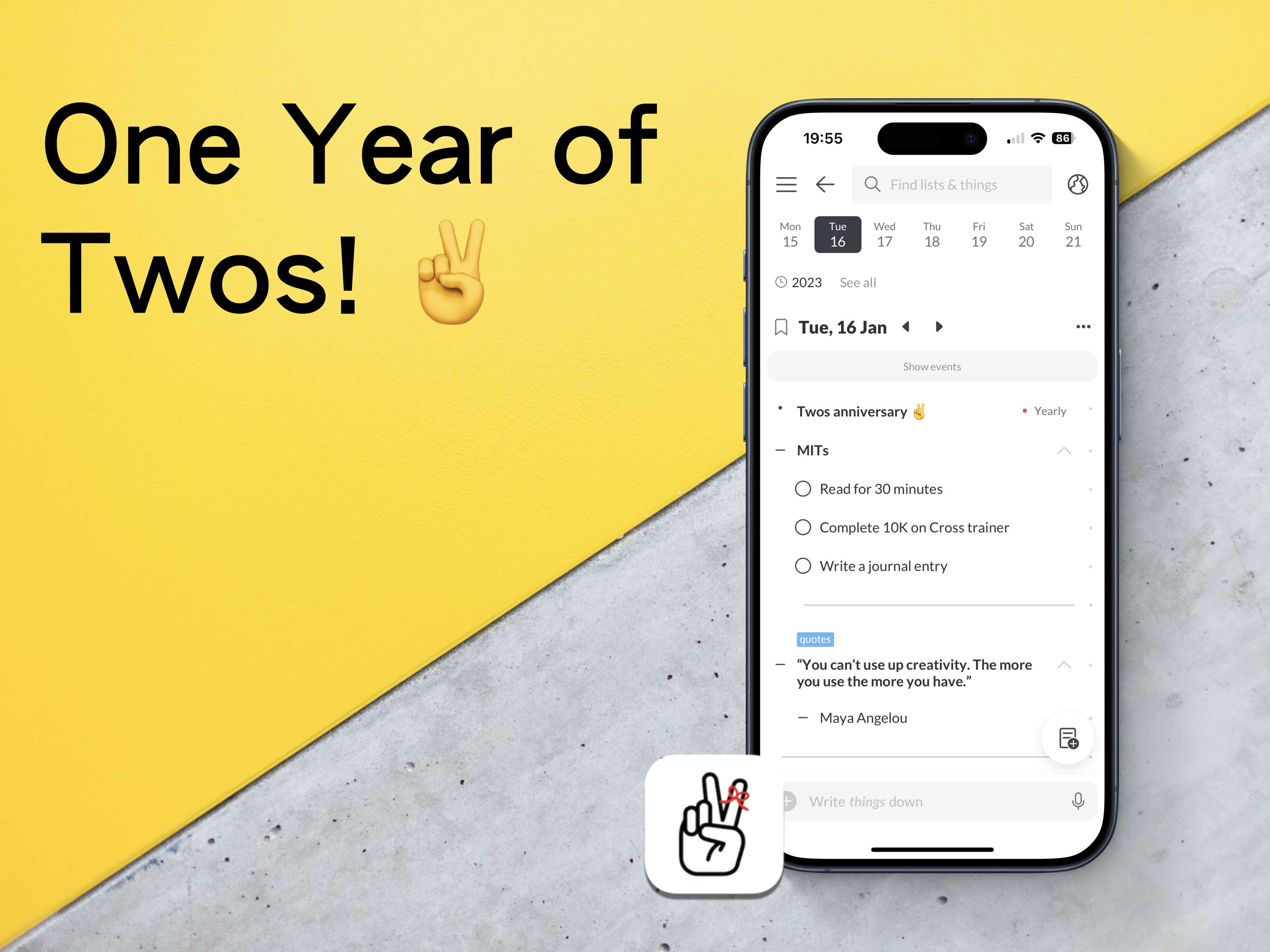
One Year of Twos!
A chance encounter with an app changed how I write things down.
I know I have mentioned this many times before, but I will briefly mention it again (briefly). At the start of 2023, I had a disastrous experience with a popular note-taking app, which meant losing an entire project for work. There was no way of recovering the data, and the app’s customer support had no way of recovering what I had lost either.
All I wanted was something to quickly capture ideas, thoughts, links, and tasks. To be honest, the app in question did not really do this. It just looked pretty. It also functioned like an old, dying elephant.🐘
I set out to find something better. Something that would work across all the different platforms I was using at the time. It had to be quick, enjoyable to use, clutter-free, and have a great community that wanted to help each other learn how to use the app.
I found such an app. It is called Twos!✌️
Imagine an app, a digital bullet journal of sorts, where you can add notes, tasks, events, link between notes, and share your information with others. Well, that is Twos. It is free with purchasable Pro features. However, you can earn in-app coins to purchase these pro features for free. Sign up with this referral link to receive 200 extra coins — https://www.TwosApp.com?code=codemaclife
First steps
I created an account, followed their onboarding instructions, explored the settings and played around with every feature it offered. I was greatly pleased with what I was experiencing. Dare I say, I was getting excitable. That was one year ago on the 16th January. Eight days after the regrettable events that had unfolded in the other app I was using.
I read a bit more about Twos. I wanted to see what people were saying the good, bad, and ugly about using Twos. I couldn’t find anything bad or ugly from the users, which made me sceptical. Furthermore, I was keen to explore to see if their claims of the being great were true or not. There must have been an hour or two dedicated to be reading the Discord channel and other comments across the internet. This was before I had written anything more than a task and one thing(things are each block of information in Twos).
I thought to myself — why don’t I just start using the app and learn the basics while I write things down in Twos?
Similar to bullet journaling, I wanted to start with keeping it simple. I know from working as an educator in England that getting a solid foundation of knowledge is key to building further skills.
I have no idea how long I spent in Twos on the first day, but I remember my phone’s battery went down to a single digit. I’m not one to spend a lot of time on my phone, and I don’t remember the time I have ever let my phone drop before 10%. Twos was mesmerising.
Now
Fast track to 365 days of using Twos. How has it gone?
It doesn’t take me long to figure out if an app will be the right fit for me. I have experienced a lot of them across three and a half decades of using computers. I’m confident to say I can make a verdict on an app within two hours. Many of them have the same features and a slightly different approach to aesthetics.
Twos is the first app in a long time when I haven’t thought about leaving. I expect I will be using Twos in five years time. Seriously, Twos, please don’t go anywhere! 🙏
I genuinely believe my experience of using a bullet journal and love for minimalism has influenced my unwavering admiration for Twos.
I work in a fast-paced environment. You wouldn’t think schools would be chaotic, but they are. I also have many responsibilities outside work, too. Being a father means I have to keep on top of my son’s busy, social schedule. There is a lot to process, mentally and physically. Don’t worry, though. Twos has my back.
The ten-month reset
Around ten months, I backed up my Twos data and deleted it all. I wasn’t planning to leave Twos. In fact, it was me thinking about how I was going to use Twos long-term.
Through trial and error, I tested all the different possible ways to use Twos. I mimicked approaches I had seen through the internet and Twos World (more on that later). There were a handful of systems I had previously used implemented in Twos. To be honest, my things in Twos were starting to look like a mess. I needed a new start.
With a blank slate, I create a list. It was called Twos — Part 2. Lists are like collections in bullet journaling. I sat down and thought about what I wanted my Twos system. In BuJo terms, I rapid-dashed ideas down as things in the list. Nothing more than five minutes and I had the ideal system for Twos.
I now have something that is easy to use, easier to maintain, and the easiest system I could possibly use in Twos.
Two features I use each day
Home
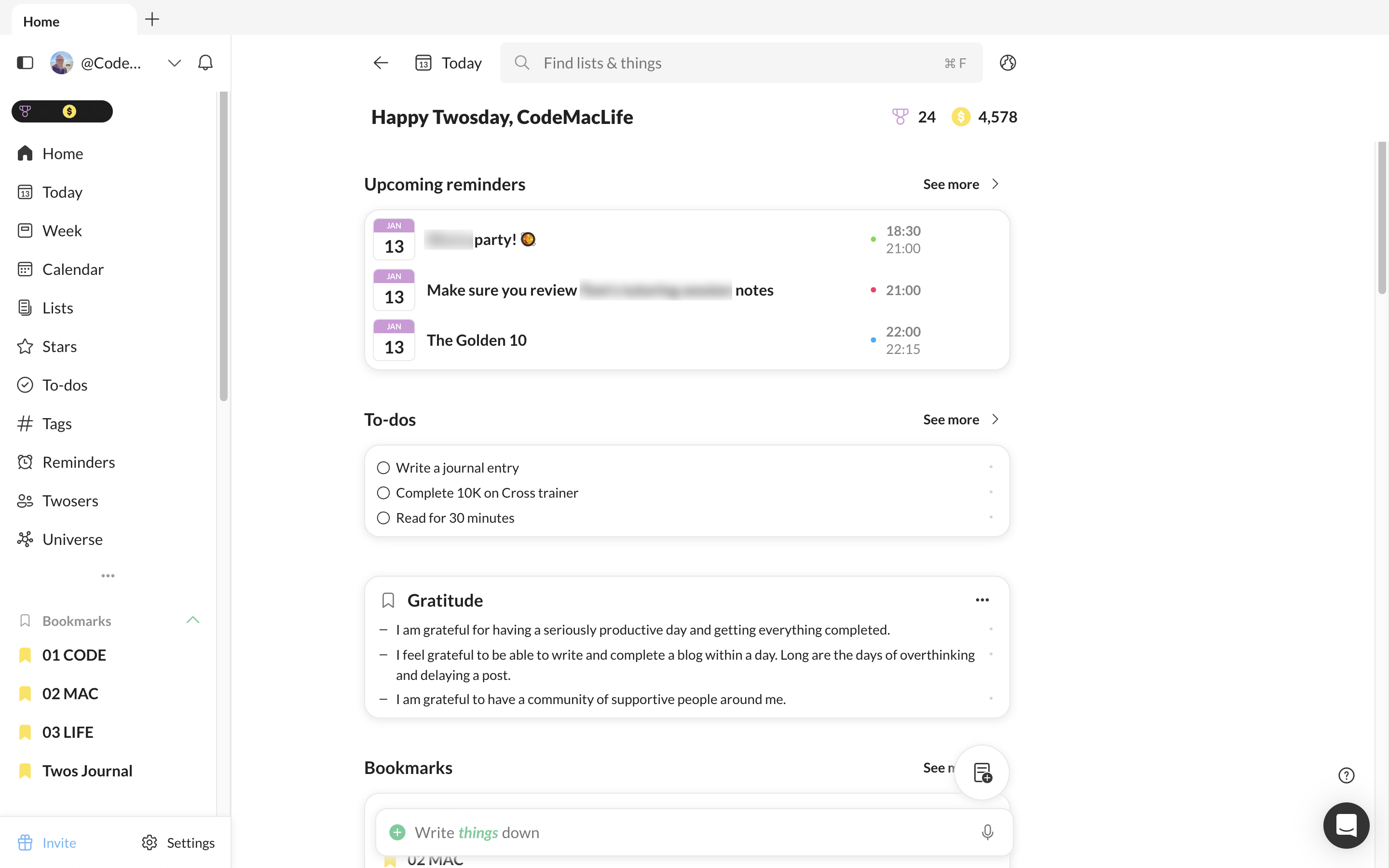
I dismissed the home page for a while. I always had my Twos set up to go to the Today page. However, I thought about the areas I use the most and thought it would be better for me to set them up on the home page and enable Twos to go straight to the home page. The Today link is always available from there anyway.
I have upcoming events, tasks, a gratitude, and affirmations lists I add to each day as well as my week view. Tags, stars and recent are all available from the Home page, too.
Double tap entries via Apple Shortcuts
Whether I am reading an article, thinking of an idea or want to record something to expand later in the day, I can double tap the back of my phone to enable the Twos prompt. It allows me to quickly add a thing to my Today list. There is no need to open Twos and add to my Today page, enabling me to get back to what I am doing.
To achieve this, I used Apple Shortcuts to create a shortcut available for Twos. In Settings, I went into accessibility > Touch > Back Tap. You can choose from a list of phone features or one of your Apple Shortcut list.
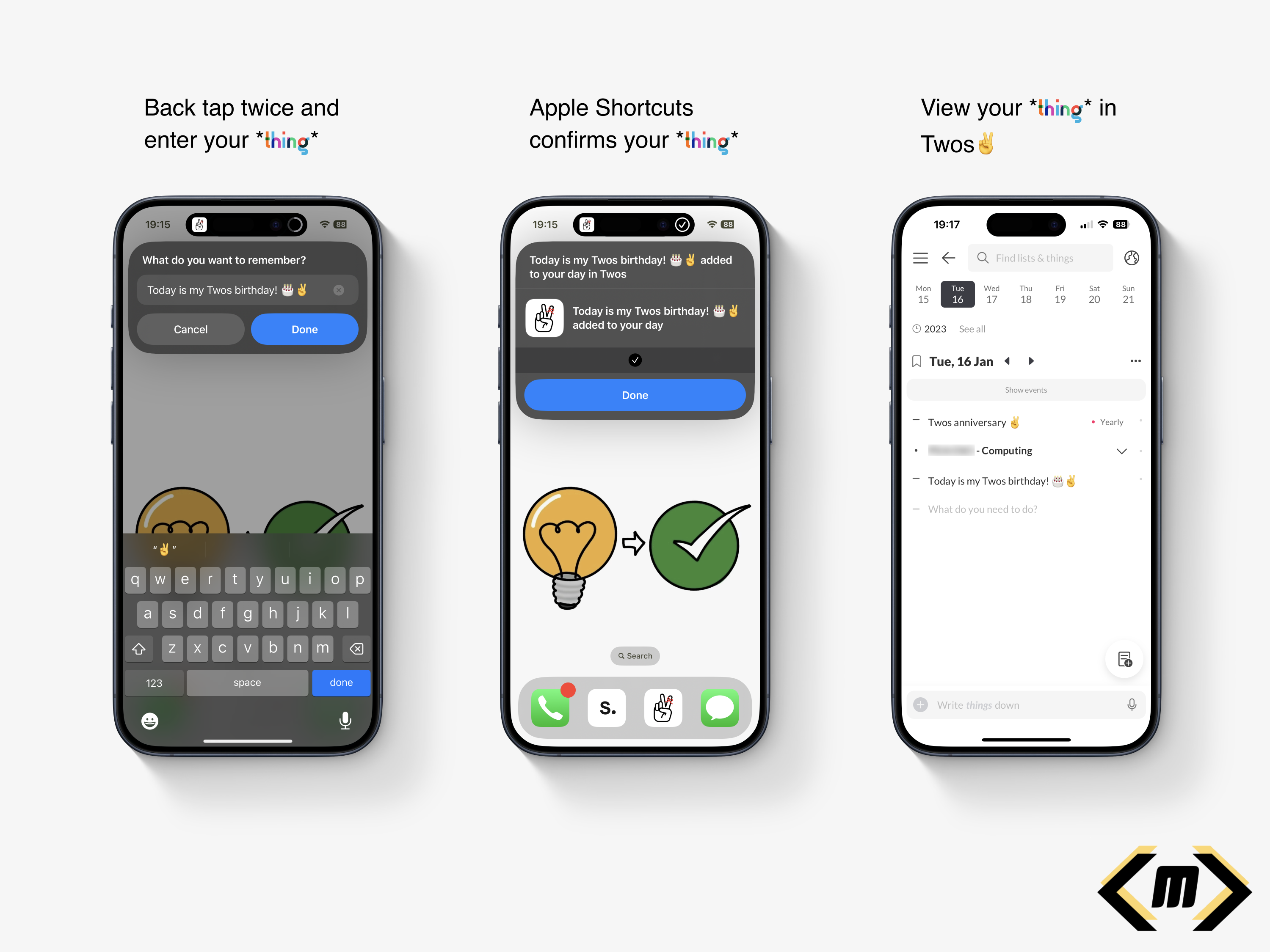
I feel my back tap method is a reason why I use Twos so much. It is quick, convenient and allows me to continue with what I am doing. There are distractions from Twos or any other app, just a simple prompt saying ‘What do you want to remember?’
Twos World
If you have no idea what Twos World is, here is my explanation and why I love accessing it each day.
Twos gets its name from the ability to record, privately or publicly. There are two options. As default, your tasks, events, links, photos, notes are private. Only you can see them. However, the second option opens up a whole new world of possibilities.
Twos World is where you can access, like and comment on the things and lists of others. It is a haven of knowledge, learning, quotes, and personal experiences. It is a positive social media-like experience. No negative vibes here. We are a community of individuals who want the best for each other.
A particular favourite of mine is book reviews/notes. I like how I can read the notes from a reader’s post. The summary, quotes, messages, and reflections make Twos the perfect book club. I have been inspired to buy the books myself. At the same time, I have seen the content and chosen not to pursue a purchase. My time and attention is valuable, meaning I can spend my efforts on a book I will take value from. Thank you, Twos community!
Sharing on Twos is like having your blog. To prove a point, this post is available on Twos to read. There’s no option to have a custom domain, but it is a great start to sharing your content online. Did I mention this is all free? No added subscriptions here!
Twos have come a long way
The Twos app I used one year ago is noticeably different to the Twos app I use now. A lot more useful features have been added to make Twos the perfect companion to use every day. Look at the Twos Roadmap to see what has been added and what is coming to the app.
Toggle headings have to be my favourite feature of all. I don’t necessarily want information in a new list, but I would like to be able to hide the content when I am viewing it on the Today page. By introducing the toggle feature, I was able to focus on the content that needed my attention without being hidden with an array of other information.
Talking about focus. Did you know Twos has a focus feature? It requires a bit of further polish, but it is great for those who want to time their activities. I like the Pomodoro technique because I struggle to focus for 25 minutes, or I spend too long on an activity.
To be honest, I could write a blog or two about the features of Twos. I have two already:
I created a list of the features from the roadmap I would like to see come out — here.
Features I would like to see come to Twos
Some features are not on the list above. I believe these would make great additions to Twos. I hope they would help others.
Twos Extension
Twos has an extension to quickly clip an article or website. I find it useful when I want to quickly capture the website without opening up Twos. Unfortunately, the extension is missing from Apple Safari for Mac. This is my primary browser. I would like to see the extension come out for Safari via the Apple Mac Store.
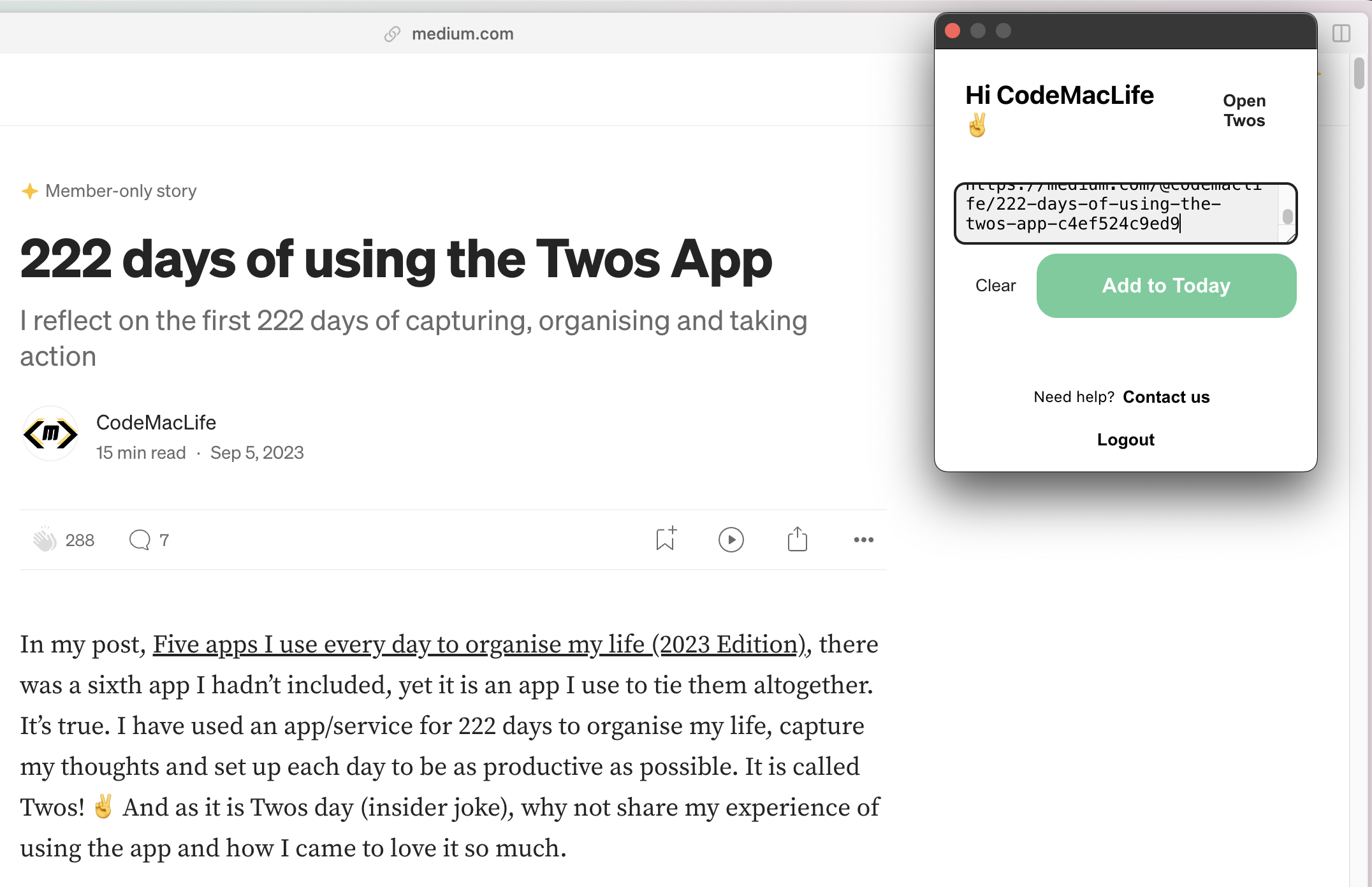
Another thing missing, and I believe, an option underneath the extension to add a comment about the bookmarked link. There have been times when I have bookmarked a link and then wondered why I had. I have no idea in what context I saved it. Twos is a tool for remembering, after all. I would expect the captured website to save as a toggled header, with comments about the website to be indented below. Having comments to with the content you save is useful for the future self.
Offline for desktop and web app
There are times when I purposely go offline to keep focus. Other times, I simply don’t have access to the internet. Twos works amazingly offline on the phone and tablet apps. However, I am yet to experience all of my content offline on the desktop.
I believe Twos needs a PWA experience with full access to your data when offline. I know how useful it was when I used Amplenote for six months. The desktop apps for Twos can be hit-and-miss. I can gain access to some lists and the Today page. Other lists hand with a message saying it is trying to receive the data.
I try to avoid using my phone, so the desktop is where I mostly use Twos. Safari is my main browser and Arc is my backup browser. If a PWA could be available for both, that would be great news.
2FA
I would like to see 2FA come to Twos. As I enter more information into the app, I would like to know I have an extra layer of protection for my data. I trust Twos with my information. Unfortunately, there are plenty of bad actors out on the internet who would like to gain access to user’s content. It also doesn’t look good for a company when their customer’s data is breached.
Backlinks
Already on the roadmap, backlinks is another feature I want to see. Linking words with two lists is a great way to link thoughts. Even better would be the ability to see how the lists are connected, with a toggle to see in what context the two lists are connected.
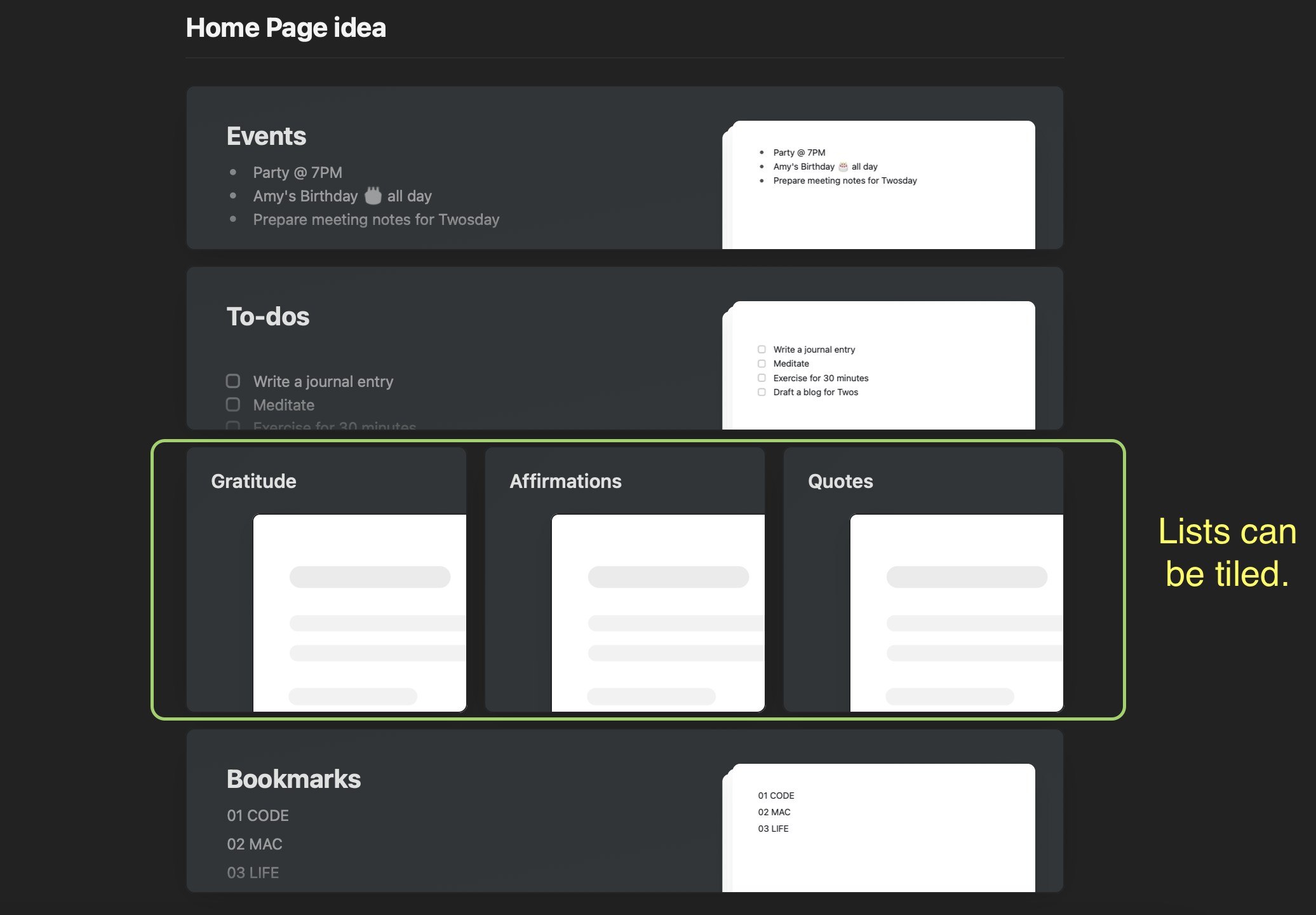
Finally — tiles on the Home page
I have three linear lists on my Home page — gratitude, affirmations, and quotes. It would be great to see them tiled next to each other like they can in the Craft Docs app. It would save me having to scroll down to access the lists out of view. I’m not sure how that would look on the mobile screen. Maybe three smaller squares? In addition, it would have the option to hide the preview of the list’s content. The minimal look would be aesthetically pleasing.
Thank you, Twos✌️
I feel so lucky to have found Twos when I needed it. I can’t thank Parker, Joe, and others who worked on Twos, especially Nino’s design and feature ideas.
If you are interested in Twos, use my referral link to sign up — https://www.TwosApp.com?code=codemaclife
As always, thank you for reading my post.
Mark @ CodeMacLife
Follow me on Micro.Blog
Follow me on Mastodon (AllThingsTech)
Follow me on Medium
Follow me on X / Twitter
Follow me on Tumblr
Email me at connect@codemaclife.net
One Year Without Gaming 🎮
Quitting gaming helped me refocus my attention on creativity
At the start of the 2023, I set out on a quest to remove gaming from my life completely. I, personally, had doubts about it being a success because gaming had been a considerable part of my life and identity (sadly). However, I knew I had a problem with working on my priority tasks over gaming. “One more go,” I would tell myself. Or the classic — set a timer for twenty minutes and hit the repeat button enough times to rack up over two hours of gaming.
I knew it wasn’t healthy, but I did anyway. I also continued to get stressed when I was behind on my work due to my lack of available time. Not only that, but I had lots of time, but I chose to waste it on gaming. Similar to the website I referenced in my first post, I thought about a 90-day game detox. However, three months would not be enough for me to complete the goals I wanted to achieve in 2023. I needed much longer than ninety days. Let’s go for the full 365 days!
It’s called procrastination.
It’s called procrastination, and I have a lifetime full of it. I completed plenty of jobs and projects in my day before the challenge, but I don’t enjoy it, even if I would benefit from putting in the effort. Procrastination, to me, is prioritising what I want to bring me joy over everything else. However, procrastination is not always a good action to take if it causes stress further down the road. There have been countless times when I have looked helplessly at the clock while staying up late to complete a piece of work that should have been done earlier in the day.
How quitting gaming helped me refocus my attention on creativity
I believe I have mentioned in another post somewhere I had put off the act of creating a blog for nine years. I went on a pursuit of happiness instead. Gaming, YouTube (of games), and listening to music were my preferred choice to chasing my aspirations. These habits were toxic for me. I don’t believe any of them are bad in moderation.
To say I was bored throughout the year would an understatement. Boredom can be uncomfortable. Boredom can also open up your mind to becoming creative. I had read in several articles, books, and University lecture notes while studying pedagogy.
With no game to turn to, I had one choice — look for something else to do. I spent hours researching how to blog, what platform(s) to use, and what skills would be needed. I signed up for a few courses and developed a style of blogging that I knew I could keep up consistently.
I read a lot more than I have ever in my life. Furthermore, I drew ideas and thoughts from these books that fed into my blogging. There were more hours freely available to read the bookmarked articles I had stored up to through the years. Some articles were not relevant any more, so I deleted them. I even managed to clear the 48 articles I had saved on Medium.
It’s remarkable what you can achieve when you make the time to follow your aspirations! Well. It has been a year since I posted that post (and the seventh month update).
How did I do?
The good news is I kept to my promise and stuck it out for a whole 365 days. I achieved something I knew would be the hardest challenge to date. I love gaming. It is the one thing I remember growing up and hanging out with my friends. We had our other adventures, bike rides, late-night kickabouts, but gaming always crept into the conversation.
The hardest part was breaking a habit I had relied on for a long time. Time blocking and revisiting my note of how I was going to achieve my goals helped me massively. I wrote a personal journal about the experience, reflected daily, and kept a closer eye on the other goals I had on my list. The experience was difficult from the start. There was no rational reason why I should have chosen to game over my goals. Gaming would not help the process of gaining what I truly wanted.
Temptations
Yes. There were many temptations because I’m human, after all. Gaming had been a habit for more years than I would like to acknowledge.
These temptations were directed at specific games, not gaming in general. In fact, it was three games I wanted to play: Minecraft (Java edition) on my MacBook Air; Forza Horizon 4 on my Xbox; and finally, Mario Wonder for the Nintendo Switch. I abstained.
I was exposed to gaming through online posts, friends, and my son gaming at home. I decided to unfollow users on X (formerly known as Twitter) (sorry) and gaming topics because I would rather not read content that was not relevant to me. Bookmarked links in my browser were removed, and I made sure there were no games on any of the devices I used. Apple must have known because the top suggestions on the App Store were games. Nothing was ever creative or productivity related.
My friends were understanding for what I wanted to achieve. Unfortunately, there were evenings when they all FaceTimed, and I was excluded. I was like the green bubble in the group.
My son wanted to show me something he was doing on a game. These requests slowly reduced over the year as he sensed I did not want to be around him while he was gaming. I felt bad. I want to show enthusiasm in what my son finds interesting. He also missed the times we would game together. Now that the challenge is over, I can sit with him and play something like EA FC24 or Minecraft together.
Around the tenth month mark, I started to get twitches. The gaming industry started spewing out new titles. My son made a list of what he wanted for Christmas. He mentioned what his friends were into and why X game was going to be a great hit in 2024.
Moving into 2024 — Will I start gaming?
Absolutely! I have been excitedly counting down the days. I won’t, however, be going back to my old ways. The difference being I will be selective and schedule the time in on my calendar. I have chosen a Friday evening for a maximum of one hour. I consider it to be a reward for working hard through the working week.
I will allow myself to have one game, preferably a puzzle game, on my iPhone. I’ve seen a few on Apple Arcade, but I haven’t decided which one I want to pick. Stitch looks like a good one to go with.
On my Mac, I have decided to continue with Minecraft because it is one of my favourite games of all time. Survival, in particular, is the best option for me, as the challenge of playing on hard mode gives me enough endurance.
I bought Super Mario Bros. Wonder for my wife and son. I want to try it out because they rave on about how good the game is. My wife, who is not a gamer by any means, has not put the Nintendo Switch down over the festive holidays. She absolutely loves this game and recommends it highly.
Final thoughts
Obviously, I can’t play all of these games at once. I am contemplating rotating them each week for variety. I’m sure there will be a time when I want to focus on a certain game. Either way, I won’t be going back to my old gaming ways.
Limited, but accessible gaming is the way forward for me. There is no way I would go through with this challenge again. The challenge was a success and I can say I have achieved what I set out to prove I can focus on other things.
My creativity, sleep, and motivation improved during the gaming challenge. I don’t want to let that slip in 2024.
As always, thank you for taking the time to read my post.
Mark @ CodeMacLife
Follow me on Micro.Blog
Follow me on Mastodon (AllThingsTech)
Follow me on Medium
Follow me on X / Twitter
Follow me on Tumblr
Email me at connect@codemaclife.net
My favourite place
Life at the beach is priceless. Every time.

There are moments in life when I feel most grateful. As 2023 ends, I reflect on the most important adventures and people. My family stands out above all the rest.
One adventure, where I get to relax and disconnect from the world, is my time I spend on the beach with my wife and son. Nothing beats the feeling of complete relaxation with the people you care the most about.
My memories at the beach are priceless. I can’t think of a better place to be. The smells, sounds, and beauty are all too vivid. Here lies my true Nirvana.
It is a time to put my phone away, remove my watch and get caught up in fun activities on the beach. Time stands still.
I will intentionally leave my Apple Watch at home and put my phone in the place we stay in (these photos were taken by my wife, who doesn’t disconnect like I do). Disconnection through my digital detoxes helps me relax more. Even a post this year by Outer Banks Vacations listed a few benefits of spending time on the beach. I agree with it all. Ideas for my creative thinking go into overdrive. My mental health feels restored. Moreover, I could do with a bit of vitamin D.
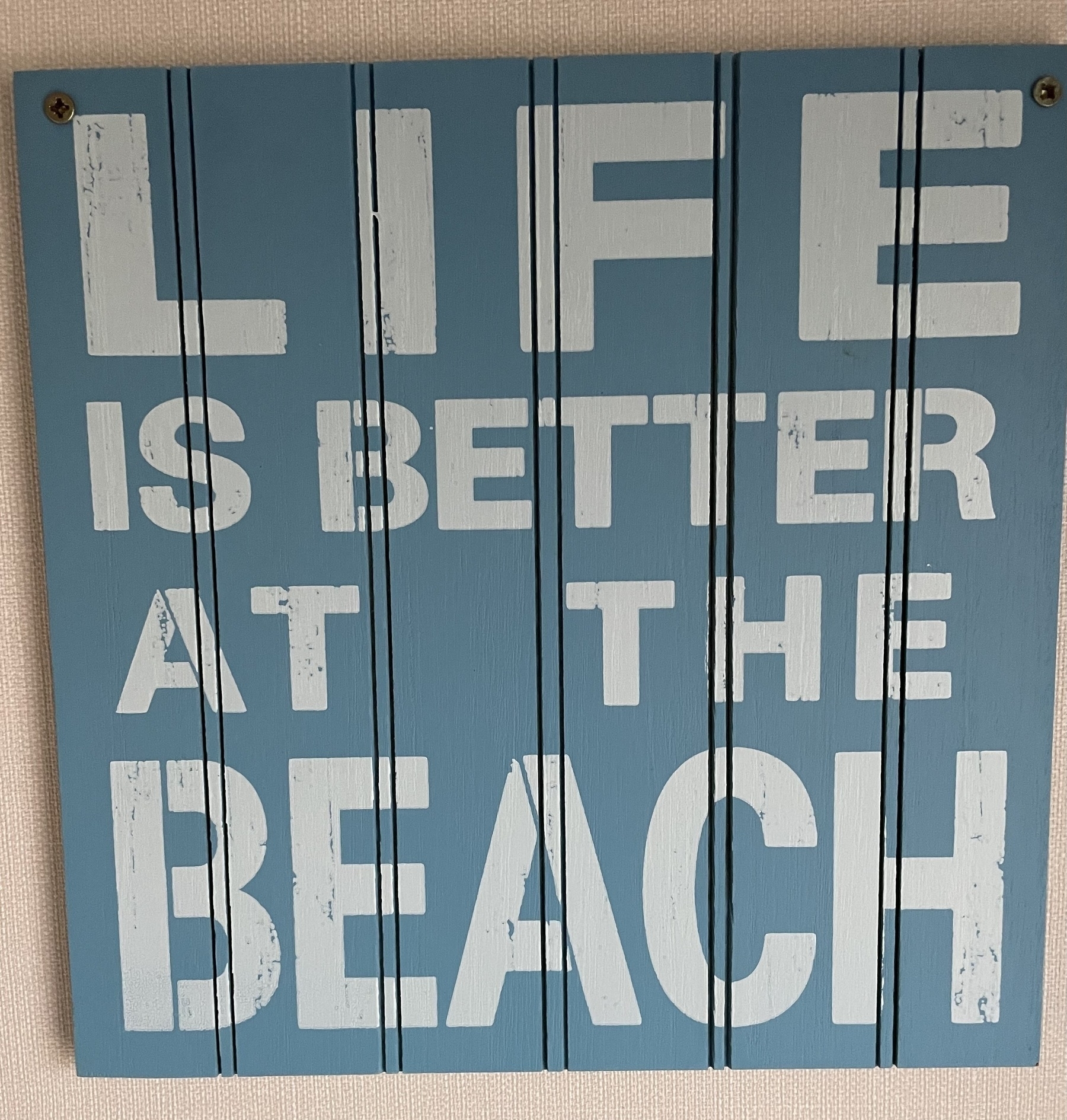
In 2024, I plan to take a few trips to the beach with my family. We are even lucky enough to explore Cancun, Mexico, later in the year. I am excited about that experience because Mexico is a country I have wanted to visit for a long time. I’ll make sure I upload some images from the trip, courtesy of my wife’s camera.
Life is, indeed, better at the beach.
As always, take care and thank you for reading my post.
Mark @ CodeMacLife
Email me at connect@codemaclife.net
Five days of NOTHING!
Why the five days after Christmas are my favourite time of year.
I know people who can quickly tell me what their favourite time of year is. They can tell me why and make the connections to something significant in their lives. I have never had that time of year to appreciate.
That was until I started reviewing previous journal entires, both handwritten and digital, spanning over the past three years.
There is a common theme. There is a moment of the year I feel more relaxed, motivated, grounded, and happier than any other time of the year. From Boxing Day to New Year’s Eve, I am at peak happiness (26th — 31st December).
Why?
Why, I hear you ask. Well, it’s simple.
For a start, I’m with my family and at not at work. This is not saying work is bad. I love spending time with my immediate family — my wife and son. We are all relaxing and enjoying the time together as well as the gifts we received. Moreover, I look forward to the annual Boxing Day lunch at my in-laws. This year it was lasagne, which is one of my favourite meals.

Secondly, I go through the process of reviewing the year and what I have achieved as well as the things I did not achieve. Through the reflective process, I find I am grateful for plenty of things that have happened over the year. Even the adversity brings new and significant opportunities.
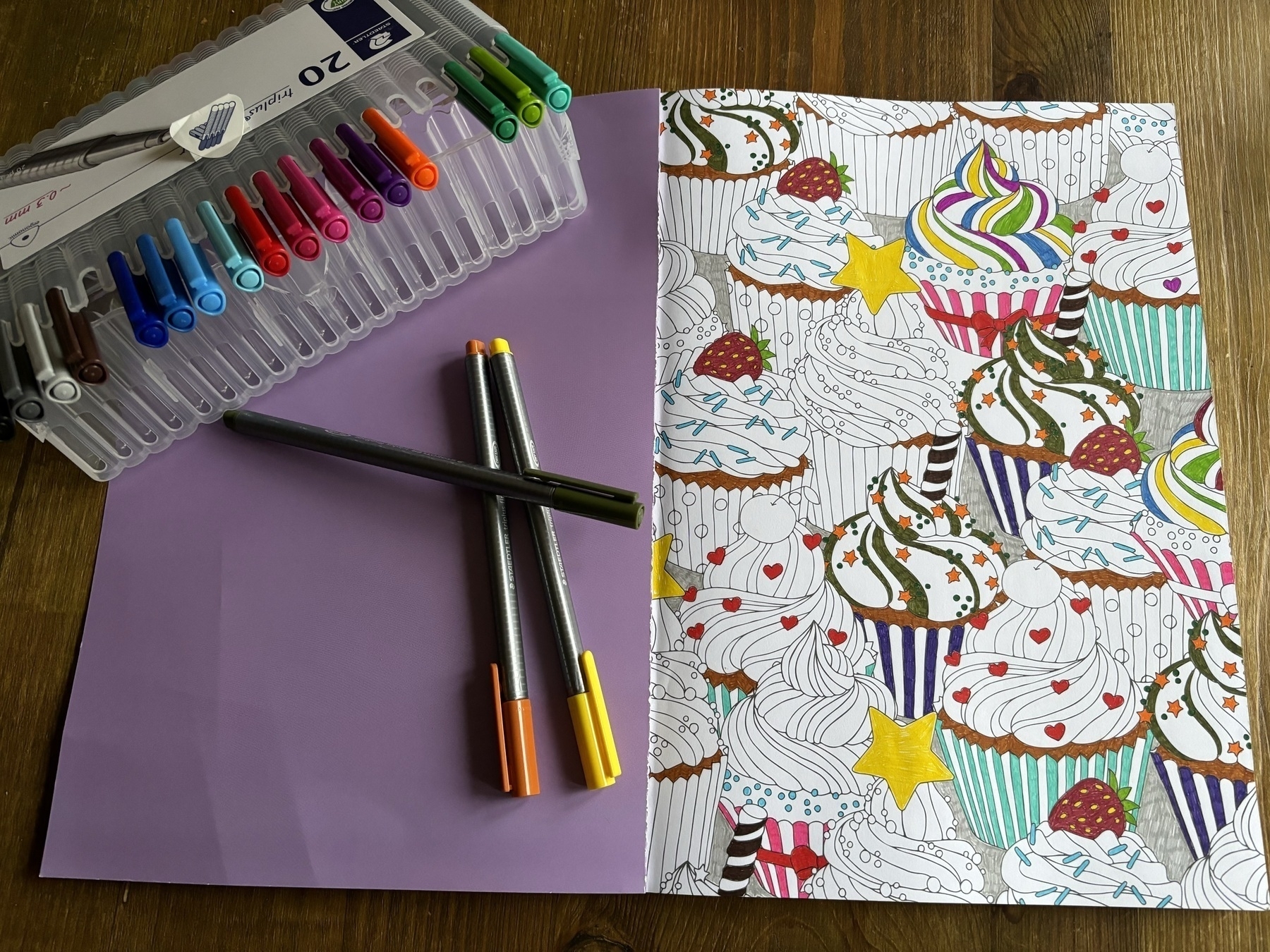
Finally, there’s nothing to do. Truthfully, there are plenty of things I could do, but I don’t, intentionally. It is my time to relax, procrastinate and follow any hobbies I have neglected over the past twelve months. For example, I spent two hours this morning colouring in a Zen mindfulness book. I only stopped because my hand was hurting. An hour later, I was writing this post without a care in the world.
Reflection
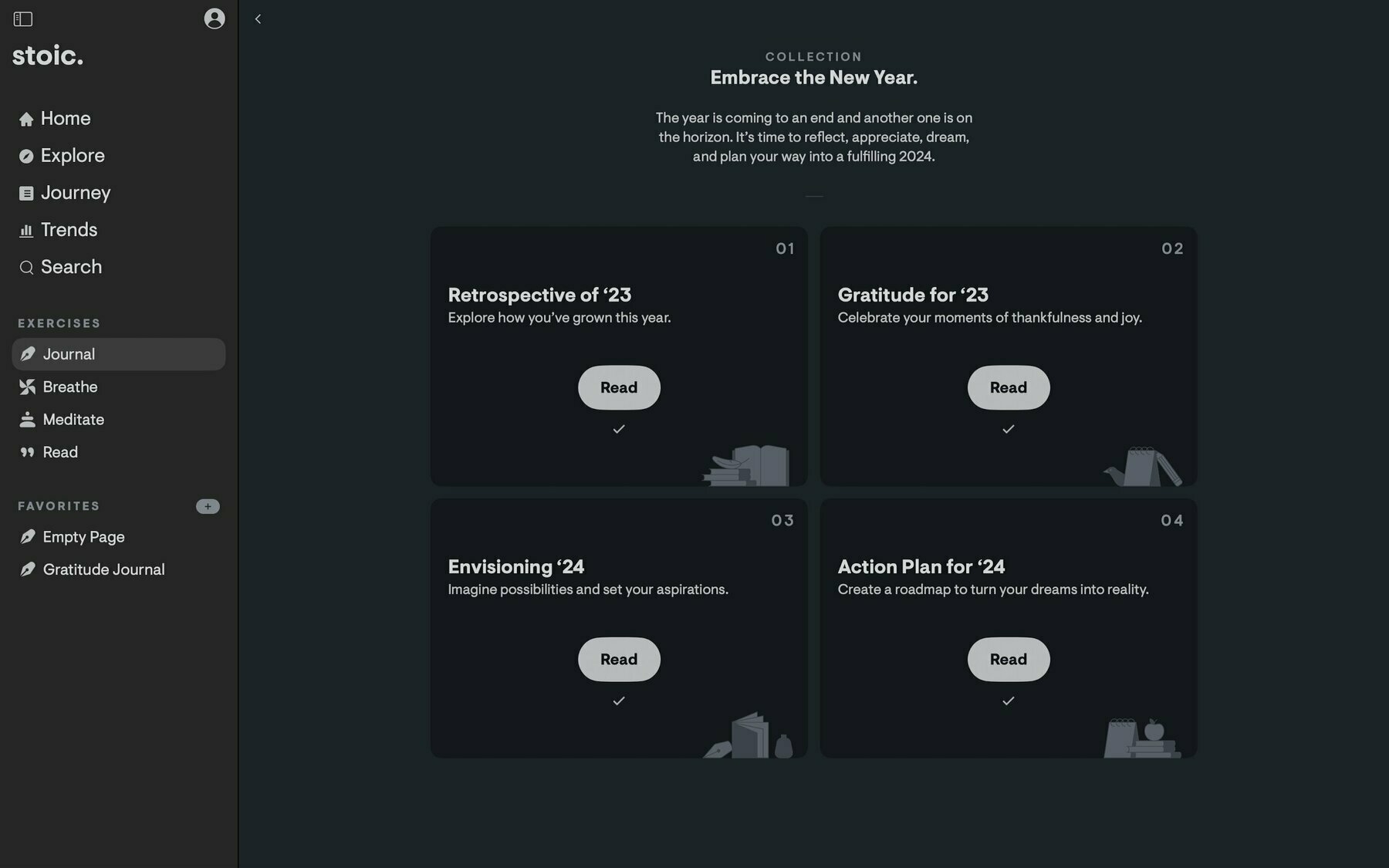
I had time this morning to complete the Embrace the Year collection journal in Stoic App. It was an opportunity to truly reflect on 2023 and plan ahead for 2024. I believe the year will be great. I made a list of things I wanted to achieve in 2024, but I won’t touch any of it until 1st January 2024. What I have wrote in my list of things to achieve will take a lot of work. I’m not ready to start on them until I have enough physical and mental energy to challenge myself properly.
The next five days are all about guilt-free ‘free time’ where I can do what I want and not worry about optimising my productivity outflow or whatever nonsense these productivity gurus spew out. You know the people. The ones that have to optimise everything to be more productive or more hardcore!
I’ve been alive for 41 years and worked in several industries. I’ve found the key to productivity — happiness. No-one will be their best if they don’t love what they do. One aspect of building that happiness is switching off from the grind and resting. Your body will thank you for it. Your mental and physical self are connected.
These five days will be focused on resting to let my body recover from a busy term I had working in a school.
Thereafter, I will have one week to review and draw out actionable plans for the year ahead. Until then, it is time to relax and enjoy my favourite time of the year.
I wish you all the very best for 2024. Aim towards your goals, but please don’t burn yourself out in the process. I’ve been there. It’s not pretty.
As always, take care and thank you for reading my post.
Mark @ CodeMacLife
Follow me on Mastodon (AllThingsTech)
Follow me on Medium
Follow me on X / Twitter
Follow me on Tumblr
Email me at connect@codemaclife.net
A few truths about quitting social media
I’ve been there, got the t-shirt, and came back online.
I have my fair share of stories about quitting social media, returning, or never going back to certain platforms. It’s that time of year when we preempt our wishes and desires for the year ahead. Each year, I strategise what I want to achieve and how much I would like to use social media in the year ahead. 2024 is no different.
I’m not quitting social media or having my bi-annual digital detox next year. I have kept up the tradition for the past five years. Instead, I will be using the platforms sparingly and focusing on posting once and publishing to many places using my micro.blog account. I will share more about that in a future post.
For now, allow me to share with you a few truths about quitting social media or attempting a digital detox.
Start with your phone. Always your phone.
In all my attempts to quit social media for 30 days or a year, I found the single most effective way to stop accessing these attention limpets was deleting all the social media apps from my phone. Your battery will thank you for a start. My iPhone can last two days because I have nothing battery intensive on there. I know one or two people who have to charge their phones around 2pm on the same day because they Meta-maxed out. Don’t be that person.
Instead, access your social media accounts through a web browser on your desktop. If you want to go ‘hardcore’ (thanks, Elon), you can sign out each time you have finished with the service and sign back in after each session. The added friction will make you question if it is seriously worth the hassle of going online in the first place.
There is also the questionable privacy aspect of using social media apps on your phone and tablets. Have you even seen the App Privacy section of these platforms? Just for a bit of fun. Go to Facebook on your App Store/Google Play Store, and scroll down the list of data the app requires from you. I’m yet to write a blog that requires that amount of scrolling.
You will lose friends and followers.
It is sadly inevitable that you will lose followers. I have a small following, so I notice when I lose 20-plus followers on any of the platforms. The longer you are off the grid, the more followers you will lose. Don’t worry. The loyal ones will stay, and you will be one less person in a viewer’s infinite doom-scrolling session. I found you will gain more once you go back online. You don’t need to be validated by the number of followers you have.
When I first quit Facebook and deleted my account, I had some so-called friends act funny with me. They became distant, and I was not invited to some events because I did not see the post on their wall. They forgot, as I had disappeared from their attention. If it doesn’t happen online, it never happened in the first place. The situation got worse when I quit WhatsApp.
I’m not saying people have become lazy, but they want to put as little effort into maintaining real-world relationships as possible. Social media is a great catch-all solution. Why run around to organise an event when you can make one post and share it on Facebook?
Be warned. You might be forgotten.
You will start to become obsessed (FOMO)
I remember the first week after removing the social media apps from my phone. I would pick up my phone, only to realise I have no social media apps on there. What do I do now? I scanned my phone for something else to pacify me instead — an ebook! The same book I said I would read for two years ago but chose social media to consume.
I’m going to lie. The absence in your life is uncomfortable. But, remember this, you now have a lot of time to explore projects, hobbies, and goals you have been putting off. Someone who uses social media for three hours a day will now have gained 90 hours during a 30-day digital detox. Someone who goes all out with a year’s digital detox will have 1,095 hours spare. Just imagine what you can do with all that time!
You might become a little bit preachy
You might have seen these people on YouTube. They go on about quitting social media, yet they interact and upload videos online. They preach their devotion to quitting social media and why you should, too. Maybe their persuasion is to validate their actions?
The point is, you will have more time on your hand, you will get bored, and you will have no-one to speak to (unless you’re super popular). People will soon get bored with you going on about your lifestyle choice and why you think people are silly to waste their time on social media.
You will want to share your newfound experience with everyone and boast about how productive and energetic you are now (yes, you will have more energy). Which leads me on to…
You will have more energy, mentally and physically
Now, here is my preachy bit. You will have more energy and focus than ever before. Or, for me, pre-2000. Being an oldie who was born in the early 80s, I remember life without social media or being ‘connected’ online. I was full of life, went places, interacted with others in person (the shock), and went to libraries to research.
With your freedom, which is certainly liberating, you will want others to follow you because they will still be hooked up to the Matrix. You are the Neo or Trinity of the real world. You might feel the urge to free everyone from the gross world of Zucks, Elon and GooglePlex.
I found my sleep improved. My concentration improved, too. With nothing to waste your valuable time on, you will appreciate any type of entertainment that comes your way. Another thing to remember is the extra hours you gain can be put to the to-do list you have been actively avoiding. The feeling of going to bed with all tasks completed will certainly be a motivator for the next day.
If you want to return, that’s fine.
I find the act of quitting social media to be experimental. Just like foods, you can diet and reduce the amount of online consumption. It doesn’t mean you are a bad person for returning, similar to the person who decided to eat a biscuit or a sip a glass of wine. We are all human. We have needs.
The only time I would say there is a problem is when returning brings back all the old habits and negative repercussions in your physical life. Seriously, seek professional help. There is no shame in that. Addictions are addictions. They all have underlining reasons to why you are hooked.
Simply enjoy your experience online responsibly
I work in the education sector and I have to watch what I say and what I share. I can’t share a lot of what I do for work, nor can I share my productivity practices. I’m sure some will be shocked to know I use Microsoft Windows 10 sticky notes for my productivity alongside office.com. I bet you didn’t expect that. Did you? Digital sticky notes keep me organised more than you would ever expect.
I digress.
You will always get people who disagree with you. We are all unique. You don’t have to tolerate any abuse online. Report them. You should also avoid getting into any tit-for-tat disputes with others. What would your employer think if you started having an argument online? This stuff sticks.
Social media has many positives. You can connect with people with similar interests, share ideas, share advice, and be there for those who need someone to speak to. You are awesome, after all.
I’ve lost count of how many people I have blocked and muted. But, I can say with confidence, blocking sensitive topics and images can help you have an enjoyable experience online. Mental health comes first.
If you feel you are doom-scrolling, delete the apps and access them through a web browser, like I said. If they don’t offer a web browser version, don’t bother with the platform.
Another tip: Time how much time you are spending on each platform. You will be surprised. It could be that you are not spending as much time as you originally thought on these social media sites. You could even set a timer for five minutes and go through a set criteria of what you want to accomplish on them. This is how I use the social media platforms.
Final thoughts
As 2024 comes around the corner, I want you to have a positive time online. Your mental and physical health should come first. I was able to reconnect with my family, and our time together is more precious than ever. We are spending a lot more time together. No distractions. No ‘I’ll do it laters’. Live intentionally. You deserve the best.
I hope you can find the right balance and make the appropriate choices that suit you. I am interested to see what you all think about quitting social media or going on a digital detox, so don’t be a stranger. Get in touch.
As always, thank you for taking the time to read my post.
Mark @ CodeMacLife
Follow me on Mastodon (AllThingsTech)
Follow me on Medium
Follow me on Tumblr
Email me at connect@codemaclife.net
What would the ideal note planner app look like for me? (Part One)
The perfect app does not exist, but I can dream of its existence…offline.
This question is something I regularly ask myself. I have used a lot of note-taking apps, daily planners, to-do list managers, productivity all-in-ones, and even Microsoft Notepad.
Often, they don’t stick, or I use them half-heartedly because I worry my full investment would make it harder to switch if I found something that caused a bump in the road.
Full access. Everywhere.
Part one of my series will look at offline and online accessibility. As I start to migrate to a digital workspace, I am coming up against brick walls that stop me from leaving the trusted pen and paper approach. Still, to this date, I use a physical daily planner at work and for most of my family endeavours. I know I will have access to it at all times.
Just like the Christmas Carole story, I have revisited the past applications, looked at the present ones and analysed what I will use in the future. There are some features I deem essential for any app I use, yet my app stack currently in use does not meet the standards I require. Their awesomeness (subjective), lets them have a free pass. Finding workarounds makes the application work for me (kind of).
My list of requirements is longer than I could possibly write in one blog. However, I am going to attempt to list what I would deem the ‘perfect app’ below.
My context, within the education sector, makes my needs different from someone who works in business or the tech industry. It is not a Fisher-price ordeal. The education sector can be quite demanding when it comes to the technology to record, analyse and respond to student’s educational needs.
In addition, I have my personal life, blogging and keeping a family running with never-ending commitments. My soon-to-be teenage son has a busy social life to organise.
Prerequisites of a good note-taking planner
Here is a list of prerequisites I look for in an app for managing the daily tasks, ideas, events, and light journal entries.
The problem with the current landscape (for me)
Offline desktop access
I am not going to name names or single out specific apps here. The problem I am having is access to notes offline. All the apps I have tried, with an iPhone and iPad app, work exceptionally well and offer the convenience for my needs.
Unfortunately, they fall flat when I require offline desktop access. There are three times in the week when I go somewhere will little to no internet access to tether my phone to my MacBook Air. I have to resort to using Apple Notes, which is why Apple Notes is my primary note-taking application.
It is why I don’t properly commit to the said applications. I would rather not enter lots of information in an application to not have access to it when I am offline. It is becoming a real issue as I am writing more and using technology over my trusted pen and paper approach these days.
Please stop using Electron. It is a quick fix for deploying said ‘apps’ across multiple platforms, but native apps have better options for users as well as global shortcuts. I get that supporting multiple platforms takes time and a crazy amount of money to work effectively. I am willing to pay for this convenience.
Two services I will mention are Reflect Notes and Amplenote. They make use of PWAs (Progressive Web Applications) that operate through a web browser and your content is accessible offline. This is perfect for those who need access at work where applications are not allowed to be installed.
I would like to see software companies explore this approach because offline access on desktop is essential. Imagine having a great note-taking app that you can’t access when you are not online. It is becoming a real bugbear of mine at the moment.
Web access
It might appear to be an oxymoron, but I also require online web access, too. Like most businesses (and schools) out there. Installation of applications can be prohibited if they are not on the list of approved workplace folklore.
This part winds me up a little. Applications will E2EE can be considered unsecured, yet outdated Microsoft Office is allowed at work. Moreover, what is with all the telemetry, Microsoft?
I have some application services that work amazingly offline in their native apps. One of them, for example, is a note-taking application I use each day at home for referencing articles, storing coding snippets and learning content. However, I can’t access it at work because I am not allowed to install the app from the Microsoft Store.
Without web access, I can’t retrieve my information from the note-taking application. Is there such of an application that gives you full access, everywhere?
Again, I resort back to my little bullet journal to record an idea, task or thought. When I have time, I will input it into the relevant application when I have time to access it.
My issue at work is I am not always at a computer. I could possibly estimate I spend 60% of my time away from a computer. If, for some crazy reason, I forget my bullet journal or daily planner, I can use my Apple Watch to input through Siri or on their well-constructed complication on my watch’s home screen.
Final thoughts
I don’t think I am the only one with this issue. I would love to get people’s input on this matter. I’m under no illusion that the perfect app does not exist. There are some apps out there that have come close.
I know 2024 will be an interesting time to see what happens in the note-taking space. I have seen many applications come out with calendar, tasks, and notes all rolled up into one nice package.
My fingers are seriously crossed that one of them comes out with a service that offers offline and web access across all the platforms I use. Namely, macOS, iOS, iPadOS, watchOS, Windows and Linux (I know my demands are complicated).
Anyway, thank you for taking the time to read my post. Part two will be coming out in January 2024.
Mark @ CodeMacLife
Follow me on Mastodon (AllThingsTech)
Follow me on Medium
Follow me on Tumblr
Email me at connect@codemaclife.net
A brief look at how I use priorities and tags in TickTick
##Simple but effective use of TickTick keeps me on task.
I have recently switched to TickTick from Apple Reminders due to accessibility issues on non-Apple devices and availability at work. All tasks added through Siri on my Apple Watch go into Apple Reminders and synchronise across to TickTick (a feature still missing in Todoist).
Luckily, TickTick has a nice import feature to transfer tasks and their attributes from Apple Reminders, including the location reminders and recurring settings.
The colours I use in TickTick for tags are the same colours I use across my folder system (Apple Finder / Windows Explorer). The same for my Twos app setup and book referencing system. I like the consistency because I understand what each colour represents.
There are some slight differences with my book referencing system, but the colours chosen for book referencing system correspond to what area they effect from the above list.
Anyway, I digress.
Priority flags
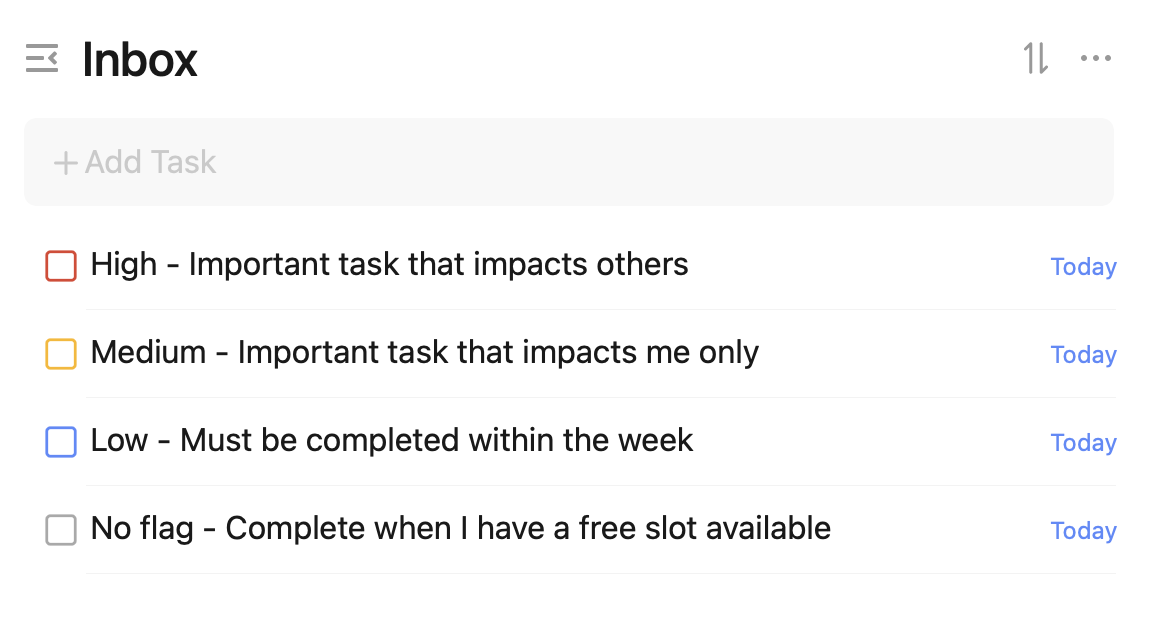
I know from the priority flagging system in TickTick, I am not using it as intended for the Eisenhower Matrix to work properly. I don’t intend to use it this way. I use Carl Pullein’s Time Sector System, so my tasks are organised by time anyway.
Priorities are set up in a way that puts others at the forefront. Yes, I have my own important tasks. However, I like to make sure my actions do not impact others. I don’t believe it is fair on them. I must stress; however, I will not drop everything for others over my most significant tasks.
An example of a high priority happened this week. I had to get something written up for work and my son needed medicine for his chest infection. Traveling for the medicine was set to high (red) and the work task was set to medium (orange) priority. Both were highly significant. However, prioritising my son’s health was more important. By rearranging things around, I was able to write up my document for work later in the evening. I had to stay up later than I wanted to, but I managed to get both tasks completed.
Low-priority tasks are jobs I need to do within the week. Ideally, they need to be done on the days I have assigned them. If I have to move them to another day in the week, I will do so as long as the task is completed during the given week. Having this kind of flexibility is nice to have because I would have previously panicked when I had not completed a task on the same day. All of my weekly routine tasks have a blue flag assigned to them. This helps me distinguish my unique tasks from my routine tasks.
Tasks with no flag have their own importance, but they are not a priority. I will slip these in when I can. Occasionally, when I have low energy, I will start with one of these tasks because they are easy wins. The momentum will drive me to start on one of the harder tasks. I will have to be desperate to [Eat the Frog].
Tags
I use tags sparingly. At one point in the past, I did not use them at all. Now I use they to group my tasks into areas. In TickTick, I use the Time Sector System with the Kanban view for my Routines and This Week lists. Both lists are grouped into personal, work and side hustle. In theory, this should be enough for me to not have to use tags. The problem occurs when I look at the Today view where all of my calendar, habits, tasks, and routines appear in one place.

In Apple Reminders, I limited the number of tags to reduce the overwhelming options viewable to me. The plan is to keep the same setup in TickTick. I use the following tags:
###Final thoughts
My recent switch to TickTick has made me realise how much I have learnt about productivity, prioritisation, and task management over the past year. I am now proud to say I have so little tasks to complete each day because I am removed a lot of mental and physical clutter from my life.
Apple Reminders is still a great application to use if you are in the Apple ecosystem.
I plan to utilise TickTick further in 2024, especially the use of the Pomo timer and stopwatch features. I want to track how long I am taking with certain tasks to make informed decisions for my future tasks and projects.
I hope someone finds this information useful. Furthermore, I will review my configuration and update my blog if anything changes.
As always, thank you for taking the time to read my blog.
Mark @ [CodeMacLife] Follow me on [Mastodon (AllThingsTech)] Follow me on [Medium] Follow me on [Tumblr] Email me at [connect@codemaclife.net]
Bullet journaling in 2023 is still going strong for me.
I am aware people on YouTube and other social media platforms say the bullet journaling craze is over. For me, it will never go away.
The approach to bullet journaling has changed my life for the better. I am consistent with my journaling. I didn’t want my bullet journal to be inundated with work commitments, so I decided to split my BuJo work responsibilities from my main journal. Only the information I think it important will be added to my main journal.
White Bujo by scribblesthatmatter.com
Black Bujo by fieldnotesbrand.com
The Field notes memo book consists of 48-pages.
I don’t add any future logs in here. This Bujo sits in my back trouser pocket while I am at work or going on a walk. It is small and built with quality, so it sustains everything I throw at it.
My field notes Bujo mostly consists of events, tasks and notes that I need for the day. I will also transfer anything from this Bujo to my white Bujo if is needed. As each Field notes memo book holds 48-pages of dotted paper, I want to be mindful of anything I put in it.
_Each November, I reread the Bullet Journal method book to remind myself to why I use this approach, and also, to remind me of what I can add to the Bujo. _
#bullet journal #bujo #fieldnotes #journaling

A Brief Introduction and Micro.Blog Aspiration
Hi. My name is Mark. I work in the education sector within a SEMH setting (Social, Emotional and Mental Health). My background is in IT. I went to university in 2012 to retrain as a Primary teacher before settling with intervention teaching in a special educational setting by 2019. I live in England in a rural area, south of Manchester, with my wife and son.
I started “officially” blogging at the start of 2023, but I actually dipped into it at the end of 2022. My target/resolution was to blog at least fifty times in a year. I reached that target quickly on my Medium blog.
The buzz word for 2023 was consistency because I wanted to create a positive habit of writing, taking better care of my mental/physical health, and reading more. I feel I have achieved all of these. However, I am under no illusion that these are not one-off targets. They will reside with me as I move into 2024.
My focus for 2024
Rolling into 2024, my buzz word will be commitment (many people call my buzz word a New Year’s Resolution). I will continue with the habits and routines I set out for 2023. In addition, I will ensure I have a higher level of commitment to what I believe in and want to pursue.
I have written for two previous posts under minimlr.com and codemaclife.com as well as my blog on Medium. I aspire to putting 100% in micro.blog for 2024 and see what the future holds. The community aspect of the platform excites me the most.
2024 will be the year I commit to the services and apps I believe will bring together the best of what I have learnt over the past few years. Moving towards, I am committed to centralising all of my blogging content on micro.blog, so I post once and distribute to multiple platforms I use for social media.
I am new to micro.blog, but I have been learning about the platform for a few months now. I am excited about micro.blog being my new home where I share my interests, passions, and ideas.
What will I blog about?
I attempted to keep to a niche this year. What actually happened was I found I had a lot to talk about, and restricting myself became disheartening and discouraged me from writing altogether.
As my username/domain suggests, I will write about coding, macOS-related news and life in general. However, this description is too broad, so I will reword it to — techie stuff, Apple-related stuff and other stuff to improve your life (maybe). 😂
Again, this is not the best description of what I write about. I write what I would want to read myself. My writing style is chatty and with a pinch of humour. I’m yet to take myself seriously as a blogger, so no professionalism will be found here.
Here is a general list of things I have written about in the past:
What next?
I am learning how to use micro.blog, how to customise it, how to move content from my previous blogs, and what I want from the blog. Some areas will be working on in the background. Other parts will be added in the next two months.
I am not sure if I start afresh on micro.blog or transfer some of my most popular posts to the platform. The stats from my WordPress site were reaching over one thousand unique visitors and people stayed on my blog to read the content. I want this to be the case for my micro.blog account.
My domain, codemaclife.com, is in the process of being connected to codemaclife.micro.blog.
One feature of micro.blog I am most excited to use is the cross-platform integration. I need to set it up in order for my posts to appear on Medium, Tumblr, and Mastodon. I don’t have any ‘mainstream’ social media accounts because I am not a fan of them.
Anyway. Thank you for taking the time to read my post. There will be many more to come over the years.
Mark at CodeMacLife
Social Links
Follow me on Micro.Blog
Follow me on Mastodon (AllThingsTech)
Follow me on Medium
Follow me on Tumblr
Email me at connect@codemaclife.net
How I deal with email as a digital minimalist
How I deal with email as a digital minimalist
Achieving email zen took time and practice
I have a healthy relationship with email. I hit ‘Inbox Zero’ each day and I feel in control. It hasn’t always been like this, though.
Years ago, I would hate the persistent notifications pinging away on my phone. There was always the high level of overwhelm initiated by the sheer number of emails I was receiving every day. My gut reaction was to not open my email client — the classic out of sight, out of mind solution. Unfortunately, this approach does not fix anything. I was not taking agency for an area of my life that needed attention. Looking back at the situation, I felt like I dealt with emails immaturely. No way did I want to take responsibility for the situation I had got myself into. I say I got ‘myself’ into the situation because failing to act on a responsibility is a choice. My immature choice.
The impact of inaction on something so small as managing email was not as subtle as I originally imagined. Email is part of our lives, even if it is not our primary form of communication. The process of deciding what to do with each email caused me a lot of decision fatigue. I remember how I would stress about the tiny details of each email. The emails I had neglected would play on my mind, even when I had ‘actively’ chosen to ignore them. I guess you could say I had many open loops without the intention of closing them.
The whole situation with email was not due to laziness. Although, I had moments of “I can’t be bothered”. The problem I found was a lack of education dealing with, and managing, emails. I treated my inbox as I would with text messages. At least my messages app grouped my messages by person. I briefly skimmed the emails with limited interest.
“Action is the foundational key to all success” — Pablo Picasso
So, I needed to take action. What did I do? Simple — I decided to ignore them. No. Seriously. I actually did. However, this time, I got myself educated on using my email client, researched different strategies/approaches, and monitored when I had the most energy to deal with them.
I choose when and how I access my email, for me to process them with the respect and attention they deserved. If they are actionable, I will decide the best method to process the email or delegate it to someone else. Everything else goes to the archive vault. Again, out of sight, out of mind, but with intention and a system!
Fixing the toxic relationship
In 2019, I went through all of my emails from school (I’m an educator) and home. I spent hours, and I mean hours, sorting through my emails to decide what I needed to do with each one. Looking back, I should have archived everything and referred back to what I needed. Maybe I could have set times in the week to spend 15 minutes maximum on sorting a chunk of them each week? A gradual reduction is better than no reduction at all.
Either way, I ended up with an empty inbox for personal use. My inbox for work had a dozen emails by the end of my purge. I knew the inbox would quickly pile up with my emails and further distraction from what I intended to do with my time. I chose to learn about the Inbox Zero approach from Merlin Mann. The site is down now, but it can be found on Wayback Machine. I won’t bore you with the approach, so please visit the site to read up on it.
I came up with six ideas to organise my email chaos. They were a set of rules to focus on that were simple enough to follow without overcomplicating the process. The plan is to get on top of the email situation, not hide from it. Here is a set of rules I follow to keep my sanity in check, focus on what is important at any given time, and respond to emails with the attention they deserve.
No client on phone
I don’t have an email client on my iPhone or iPad. There are two places where I read and respond to emails — my work laptop and my personal MacBook Air. Applying this approach at first felt strange, but now it is the norm. If I need to later reference to anything in an email, it will either end up on my calendar, shared in Apple Notes, set as a task in Apple Reminders, or copied into a folder on the relevant cloud storage solution. As a general rule, I only have notifications from voice mail, iMessage and Signal messenger. Everything else on my phone has notifications disabled.
Set times to process email
I have three set times in the day to check my email. During the working week, I will start an initial scan of my emails at 08:20. Anything important usually appears first thing in the morning before the students arrive. I record what I need and sign off. The allocated slot is 15:10 when the students have left is often the heaviest time of day for emails. They accumulate throughout the day when I busy doing the core area of work. I respond to colleagues and set up an action plan for the following day, or take action if the email requires immediate resolution. Finally, I check my personal email at home around 19:00. To be honest, I don’t receive many personal emails, so the process is short and precise.
My colleagues and close ones know I have set times in place and respond when I can. I used to be anxious about my process because I always wanted to be available. However, I found people respect you for having a steady routine. You don’t have to be available 24/7. It is healthier and maintainable eventually.
Time limit of 10 minutes
I set a timer on my Apple Watch for ten minutes for each of the three times in the day. It is rare for me to go over the ten minutes because I am efficient with the habit I have built around emails. If anything, I have to stop the timer before it goes off, as I frequently process everything within five minutes. Anything that needs extended time to respond will end up as a task.
Reduce the subscriptions
One of the best things I chose to do was unsubscribe to newsletters. I now have three newsletters I receive, usually on a Sunday, and I am able to scan through them during my weekly review on a Sunday evening. Another action I took was to remove all social media notifications. I will look at my notifications within the platform when I access them during my scheduled time for social media.
I also recommend unsubscribing to any marketing or promotions you may find from any of the services you have signed up to. Yes, you might miss out on a super cool offer. However, I have found most of the offers are of no interest to me. If your email client or service allows it, have your email go directly into topic folders for you to focus on specific areas when needed.
Sticking with the native client
I find that I have to justify everything I spend my money on, and I use that service more than I would normally with a free service. I guess I had the idea of wanting to get my money’s worth. Switching from Spark Mail to Apple Mail was a great choice. I wasn’t using the AI or third-party app integrations anyway. There is less incentive to use the native email app because I don’t feel I have to warrant my subscription. Apple Mail does everything I want to achieve. At work, I use Microsoft Outlook, which is part of the company’s subscription plan. Reducing the amount of applications makes it easier to learn all the keyboard shortcuts, too.
Develop a system
I use Carl Pullein’s approach to email. All actionable emails go into an inbox folder called Actions Today. Under no circumstances will the folder have any emails in it by the end of the day. Everything has a place outside this folder. As mentioned before, I have four locations where the content can live. The remaining emails from the day will be archived or deleted. I keep my email as Inbox Zero as possible.
Final thoughts
The habits I have developed have allowed me to write well-thought-out emails with greater clarity and consideration. I am no longer rushing to get through my email or getting distracted by the influx of content entering my email client. I would suggest you try at least one of the approaches I have mentioned above.
If you want me to write about any of the areas above in greater detail, please let me know. I am more than willing to help you with your email approach. Emails are not evil. We just need to be educated on how to manage our inboxes.
Thank you for taking the time to read my post.
Mark @ CodeMacLife
Dumb phones are not the answer to digital minimalism
Dumb phones are not the answer to digital minimalism
I’m not saying ‘dumb’ feature phones are bad if you want to partake in digital minimalism. However, there are a few drawbacks that will take up your time when you could be using it more effectively on things you enjoy. I spent eighteen months with a feature phone (technically three phones) and the experience made me appreciate the smartness of having a smartphone. The problem isn’t smartphones, it’s you. Sorry to be truthful, but like any tool, it is how you use it that counts.
Backstory
At the end of 2019, I had enough of my smartphone addiction. I was spending more time than I would like to admit on my smartphone. As I recall, I would use my iPhone for a total of 6 hours and 37 minutes per day, as Apple screen time would inform me. That’s roughly 100 days of screen time wasted per year on what I was consuming at the time — gaming, social media, YouTube and aimlessly searching for random stuff to feed my dopamine obsession.
I felt shocked and appalled when I thought about it. I was always running out of time to complete my responsibilities and jobs I had on hold. Why couldn’t I achieve anything? I was always ‘busy’, complaining that I never had enough time to do anything. My solution — stay up until 1am to cram in as many jobs as possible. As you can imagine, it wasn’t long until I made myself poorly with sleep deprivation and unregulated patterns. My diet was all over the place, and I was hooked on energy drinks to keep me alert.
Discovering digital minimalism
I knew I had to have a mental reset. I did what most people would do — I researched about social media, mental health and dependency on technology (on my phone, of course). I stumbled across some comments on X (formerly known as Twitter) about someone called Cal Newport. He had a book out called Digital Minimalism: Choosing a Focused Life in a Noisy World. I certainly needed focus, and there were plenty of things distracting me in my noisy world. I purchased the eBook and sent it immediately to my Amazon Kindle app on my phone. I read the book within a week, on my phone, and quickly realised I was responsible for my shortcomings. Even if Cal expressed developers were creating apps and social media platforms to be addictive, it was actually my fault for falling for it. Taking responsibility for my actions was the only solution I could take to put things right.
I felt anger, contempt, and frustration towards my iPhone. I hated it. Furthermore, I hated Apple and the whole tech industry. The hatred grew, and I spontaneously deleted all of my social media accounts. I disconnected myself from the world. My phone felt neglected, as I purposely left it uncharged and out of sight (to the annoyance of my family). I knew it couldn’t be a maintainable approach to my problem. Avoiding wouldn’t resolve the concern, but I was adamant I was not going to use my phone.
Falling down a rabbit hole on YouTube probably was the best thing I did at the time. Yes, I ‘wasted’ hours over a couple of nights on consuming content, but I came to the realisation that others were being awakened to the modern issue of technology co-dependency. This is when I saw videos of people resorting to going all in with a dumb phone, later to be known as a feature phone. These were the phones I grew up with before the smartphone era came along.
Enter Nokia
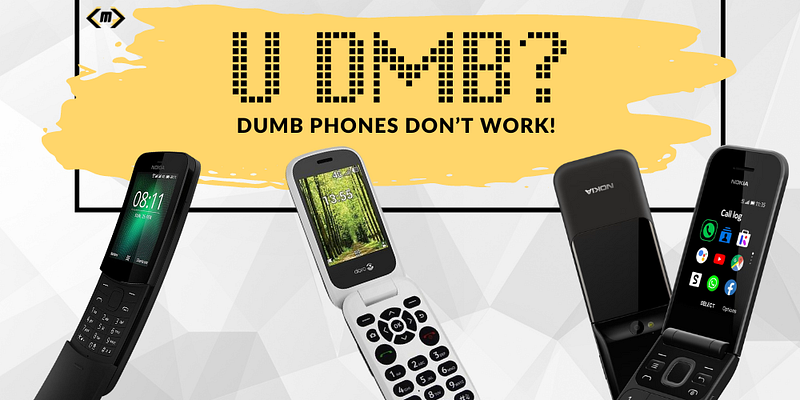
It was at this time I discovered Nokia were introducing remakes of their classics under an operating system called KaiOS. Within a week of browsing, I had a Nokia 8110 4G in my hand. The remake of the original Matrix phone, aka the Banana phone, was the answer to all of my problems. I loved it. I would show off how I was not hooked like a slave, unlike those around me. My preaching to others and high moral ground stance was embarrassing when I look back at it. I didn’t care at the time. I was enjoying life and looking down on those around me, who walked around like zombies glued to their smartphones.
Limited features meant fewer reasons to have a big data plan. I was able to go to a cheap data plan of £5 ($6.34) per month. I saved a lot of money in the fourteen months I was using a feature phone.
The 8110 4G wasn’t perfect, though. The number pad was tiny and awful to type on. I hated texting and calling people on it because there were multiple steps with every simple action. KaiOS is terrible — slow, bloated, ad-riddled, buggy and generally useless. I knew what I had to do. Search for a different feature phone! I did. I upgraded to the Doro 7060 flip phone. It had big buttons, KaiOS with Google Maps, and the novelty of flipping out the phone (quite literally) in front of others never grew thin. However, just like the 8110, the phone had its faults. The main problem was poor Bluetooth support for my car.
My wife would get fed up with my lack of ability to answer phone calls while driving. In the UK, using your phone while strictly forbidden. On top of this, my friends felt I was avoiding them by not being in the group chat. I was excluded from the WhatsApp group chat. It also caused issues with keeping up with my son’s football and basketball clubs. I had to get my wife to relay the meet-up information, which didn’t always get through to me reliably.
Back to the drawing board, I knew I loved the feel of a flip phone like the good old days. I set out to find a flip phone with smarter capabilities. I was in luck. Nokia released an ad trailer for their remake of the Nokia 2720. I was in awe. It had 4G, better Bluetooth options, a sleek design, and more importantly — WhatsApp. I could reconnect with my friends and groups. I bought the black edition because my default preference is always black. The phone was wonderful to hold in my hand. It connected to my car with ease. I was able to transfer some music across and everything was good.
Then the cracks started to show. The OS was buggy, the phone was generally slow, WhatsApp crashed, system navigation was terrible, and it was bloated with ads and Facebook. I have a problem with phones loaded with bloat.
Reverting to a smartphone
I managed to stick with my Nokia 2720 flip until the end of February 2020. There were too many issues. I was getting frustrated with the phone, and I was starting to consume hours of content on my desktop, which is no different to what I was doing on my smartphone before I switched to a feature phone.
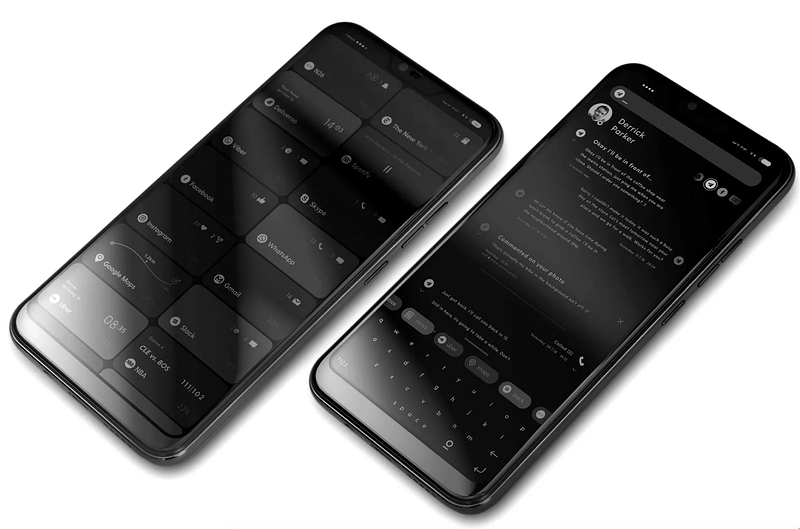
I had my eye on a smartphone that was designed for the digital minimalist in mind. It was called the Blloc Phone. It was an Android phone without Google services, which ticked many boxes and used many more tricks I knew were good for blocking addictive practices on devices, such as greyscale and minimising what you could see on the home screen. I watched videos of the phone in action, read everything I could on the phone/OS, as well as reviews from numerous outlets like Android Authority.
The phone had came out a couple of years prior, and I managed to buy it second hand from eBay. This phone shaped how I use phones today. It taught me about design language, intentional use, minimalist philosophy, and above all, the power of using monochrome to remove the need for colourful apps. You see, apps are in colour for a reason. Our brains are hooked on colour. We crave colour to get that dopamine hit. The Ratio launcher on a Blloc phone is the best launcher I have ever experienced (review). The launcher is now available on other Android devices from their Blloc website. I was able to use a smartphone without being hooked to it.
The Problem with dumb phones
Dumb phones won’t address the problem within us. They can help us disconnect and re-evaluate what we are doing on smartphones. The feature phone breaks up our dependency on constant access to the internet. However, there are some drawbacks that I would like to share.
Feature phones are not secure
Navigation
Apps
Communication
Photos and video
The solution?
So, what is the solution then? I am not saying this will work for you, but I have a few lessons I have learnt from my experience. These rules still carry on today with my phone usage. You might find some of them useful.
No social media apps on your phone — I refuse to use social media apps on my phone. Delete all of your social media apps from your phone. The added level of friction is essential to make you question whether you need to access the sites in the first place. I only access my social media platforms through a desktop or laptop. Having to make the effort to sign in, launch the browser and sign into the site is tedious, but it works. I have added enough friction to make me question if I really need to access the social media site.
Set time to access social media sites. I started off with thirty minutes a week on a Wednesday. It was on my calendar for 8:30pm. If that is too extreme, why not set the time amount of time each day? I have tried a rule where I am not allowed to access any social media at weekends, so I am able to spend quality time with my family. You want to build a habit of not aimlessly scrolling through social media. Be intentional.
Have safe spaces for your phone at home. These are typically three locations in your home where you can place your smartphone out of reach. I call them stations. The idea is to not have your phone near you all the time. I have the island in my kitchen, an office charging dock (when I’m not working in there), and a stand in my bedroom corner. I never have my phone near me when I am doing jobs or relaxing.
Only have the essential apps installed. I think this can be a tricky one to build into a habit because there are so many apps you want to try or have access to. I get it. I once had an impulse to have everything installed ‘just in case’ I needed to access it. I now focus on the following — Calls, default messenger, calendar, notes app and to-do list manager. If you need something else, think cautiously why you need the app on your phone.
This doesn’t mean I don’t have other apps installed. I have Day One for journaling, Twos App for quick capture and Upnote for practising my coding or capturing an article for scheduled reading. Removing all games is a viable option to take because it is another reason to use your phone. My gaming challenge made me think of this idea. I’m so happy I made this choice.

By only using your phone with the minimal amount of apps, you will see your battery will last longer. My iPhone 12 lasts two days without charging. I know people with a plethora of apps on an iPhone 14 Pro Max who have to charge their phone each day. Don’t be that person.
Remove ‘always available’ apps. This is probably a hard area to master. You don’t need to be a social recluse, but take care of yourself. I removed my email client app and anything to do with work. Although I have multiple social media accounts, I refuse to have any of their messaging apps installed on my phone. I also recommend you use your phone’s focus mode to block communication between certain times in the day. I have my wife and son in the exception list for emergencies. Recently, iOS has added the ability to limit what apps are available within their focus modes. For example, at 9pm, all my apps are locked out apart from the Phone, iMessage, Reminders and Calendar apps.
Go monochrome. As mentioned above, with the Blloc phone, boring monochrome is king. I use monochrome on my phone for 99% of the day. The only time I use colour is when I want to take or view a photo. The Blloc Ratio launcher has a nice feature where you can select certain apps to have colour, like the photos and camera app. My iPhone doesn’t have this feature, unfortunately. With a triple tap of the back on my phone, I can switch between colour and monochrome.
Be mindful. You need to be mindful of what you are doing on your phone. Consistency, intentionality and minimalist thinking are key to your success in digital minimalism. It’s not about being all ‘anti-social media’. These platforms can be used for good. What you want to do is take responsibility for your actions. Your phone is a tool for you to use. Don’t let the phone use you.
Finally, I would like to thank you for reading my post. If you wish to use a feature phone, and it will help you become less dependent on technology, go ahead and experience it for yourself. Just be aware that the experience will require you to plan ahead, cause friction between you and others, and become a logistical nightmare in the world we live in right now.
Mark @ CodeMacLife
What I learnt from going phone-free for a week
What I learnt from going phone-free for a week
I reviewed my journal notes from the time I forgot to pack my phone charger.
I thought I would share an entry from my journal of a time I unintentionally went without my phone for a week. The experience was not as drastic as expected, but it made me realise my dependency on my phone. It came at the same time I chose not to wear my Apple Watch. The event has changed my relationship with my phone. Anyway, here is the journal entry I roughly scribbled down on a sheet of paper:
Journal — 7th June 2023 ‘Smartphone realisation’
In the rush to hit the road, I left a small bunch of items on my kitchen island. These were essential items for the journey and the holiday itself. Two iPhone chargers, a Kindle Paperwhite, a bullet journal and my iPad. I say these are essential. However, in reality, these are luxury items to make a holiday convenient.
On my arrival at the holiday site, I soon realised the error of my ways when I went to charge up my iPad. Oh, dear. A mad three minutes of scrambling around to come to the realisation I had left the items behind. It will be a long week, I told myself.
I tried to get reception by walking to the opposite of the holiday resort, holding my hand out with my iPhone 12 in-hand like a navigator would with a compass.
It was quite a tragic moment because I was prioritising phone signal over quality family time. I’m more conscious and intentional with my phone usage and social situations than I have ever been in the past. There on the spot, I decided not to bother with my phone. I sent out a brief message on Twitter about my choice and switched my phone off immediately. The plan was to have a week away from my Apple Watch, not my phone.
What made the situation worse was not having my bullet journal to write in and Kindle. I had nothing to record my thoughts and ideas in.
The car had a cheap cable in for emergencies, so it was agreed that my son and wife could take turns when we went driving on our days out. I ended up using the car’s built in Sat Nav.
On the Saturday, I realised certain key information was in a list I had made in my Twos app, so switched my phone back on, recorded the information and switched the phone off again. However, I had three notification emails about Mastodon — new followers. I pressed the follow back, but the webpage would not load because the internet access was next to none. There was absolutely no point to using my phone on holiday. I share this moment because it highlights the dependence and unconscious actions we take with our phones.
Living without the smart capabilities isn’t a new thing to me. In 2018 to late 2019, I decided to use a feature phone (dumb phone), which helped me break the habit of using a phone as a pacifier. I used a Nokia 8810 with a £6 per month SIM card. The experience was interesting and frustrating at the same time. I learnt how to navigate life in a world built for a smartphone. I’m still not sure if people have become lazy, or they are utilising the convenience of smart capabilities. Eventually, the cons of using a feature phone were too much for me to deal with, as my job and home life were noticeably impaired with my lifestyle choice. I decided to go with a smartphone and use it selectively, using a minimalist launcher and the essential apps needed to get by.

Reflection
My experience of not having my phone for the week was not as bad as I anticipated. It would have been a different story if it weren’t for my Sat Nav. When I switched to a ‘dumb’ phone, I remember travel was a huge issue for me. The amount of manual preparation took a lot of time, taking me away from other tasks I should have been doing.
Although smartphones can be distracting (if used as a pacifier), they have an ability to simply our lives. I know this from experience. I have a sense of gratitude towards having a smartphone, whereas others, may feel they are a burden. Smartphones should be treated like anything else in their lives — used in moderation and with intention.
What I got from the experience was quality time with my family. Instead of glancing at a screen for most of the day, I would look up, be aware of my surroundings, and observe the surrounding beauty. There were electronic devices to take me away from what I had come on holiday for. That was to simply spend time with my family. For that reason, the holiday was one of my fondest memories I will ever have.
Question — Do you have any experience of ditching your smartphone for intentional living?

How is my gaming challenge going? 7 month update
Is there life after gaming? My seven-month update discusses my experience during the year.
It has been seven months since I posted that I was going to quit gaming for 2023. A whole 12 months of no gaming on any platform or device. How have I held up to the challenge so far? This post will go over the ups and downs and why I am still succeeding. My post is a cumulation of journal entries and things I have recorded in Twos app.
The beginning
I stepped into the challenge with great determination. There were so many things I wanted to achieve in 2023, and I knew by quitting gaming I would have more time on my hands to focus my attention on my goals. Completing my coding course through an online college was my priority. I also wanted to start learning how to be a full-stack web developer, even if I didn’t take it up as a full-time job.
Everything was going well. I managed the month of January with ease. No distractions and I managed to complete one assignment of my coding course within two weeks. For context, each assignment was taking me five weeks to complete before I started this challenge. Unfortunately, something major happened. Nintendo and Xbox announced Golden Eye 007 was coming out at the end of the month. What? This was one of my favourite games growing up. I had bought a Nintendo N64 when it came out with my money (life goal). Now, I knew the challenge was on! I managed to watch one or two reviews of the game and moved on with my life.
The next hurdle came when I realised I had a habit of going to my phone when I was bored. As a Apple One subscriber, I enjoyed the games out on Apple Arcade. Nothing exciting. Just the casual games such as Stitch, Alto’s Odyssey, Jetpack Joyride 2, Asphalt 8: Airbourne+, Skate City, Charrua Soccer and Sonic Dash+. Instead, I had tools that served a purpose, and my iPhone became a phone. I knew. Crazy!
Positive outcomes
Because I was focused and intentional, I managed to complete my coding course in record time. I got great results back and I felt accomplished. The weight of the course kept me distracted from the gaming. The relief of completing something I had set myself up to achieve was incredible. Before the challenge, I completed another course through the same college. I missed deadlines (a lot) because I did not have enough time to fit college work in. This was a complete lie. I had plenty of time, but I was pacifying myself through gaming. I managed to get through my business administration course. However, the number of extensions I had was embarrassing.
If anything, the challenge allowed me to be more present. I wanted to spend more time with my family and friends. Instead of ignoring my son’s pleas to go outside to shoot some ball (his words), I went outside and played basketball and got to know my son’s interests more. Prior to this, I would say I was busy, surfing the web aimlessly and gaming on my phone or Xbox. I feel so bad for the missed opportunities with my son due to my selfishness to find instant gratification. My wife appreciates the time too. I am helping out more at home and talking more.
My sleep has improved. I am not gaming before going to bed. In fact, I spend at least an hour away from any screen before going to bed. I think the process of gaming last year before bedtime kept my mind racing when I slept. I never felt like I was getting quality sleep. I use the hour before bedtime to get everything organised and ready for the next day. This means I am not rushing in the morning and I know what I am doing. In turn, I can sleep better knowing everything is sorted.
Cost. I must mention this part. Coming off the gaming bandwagon has financial positives too. I would not like to admit how much money I have spent over the years on games, hardware, and subscriptions, but I know it will enough go on a nice holiday. There were a few games I saw this year that would easily have set me back £400 in total. I resisted. I don’t have to worry about having the latest and greatest any more.
Challenges
One word comes to mind from the challenge so far — boredom. I love gaming. I’m not an avid gamer who spends hours on gaming, but I enjoy the dopamine hit it gives me. There have been temptations along the way. I have a few favourite games I liked to play before the challenge. Forza Horizon 4/5, Fifa 23, Minecraft, NBA Playgrounds, Stardew Valley to name a few. The urges often come in the evening when I have more time to wind down. That time is now replaced with reading, meditation, exercise and reviewing my workload.
Ironically, one of the issues is my son wants to play some games together. With the summer holidays coming up, it will be difficult for him because we would usually spend time bonding while playing Minecraft, Roblox or another of his favourites together. I’m sure he can cope with playing physical games outside this summer.
New titles that came out have tempted me this year, and there’s more to come out later in the year that will certainly challenge me. Street Fighter 6, Mortal Kombat 1, Super Mario Wonder, Turnip all look incredible. I will have to hold out.
Post 2023 gaming
As much as I have liked the challenge, I won’t be continuing with it into 2024. What will be different, however, will be where I focus my attention. I will allow games on my iPhone again. These will be little brain puzzler games such as Sudoku, Stitch, Tetris and SpellTower+.
My son’s aging Xbox One will be replaced at Christmas with a PlayStation 5, which he is excited about. I’m sure I will be tempted to play a game with him when he gets it. I won’t spend my time on the games console alone, though. Furthermore, I know for sure that I want to keep that barrier in place.
Both my time on the PlayStation and phone will be timed. Possibly 30 minutes per day maximum? As boring as it may sound, I want to schedule this time into my calendar and stick to it. I think three times a week is enough.
The challenge has shown me the power of intentional living. It has highlighted how productive, creative and determined I can be when I apply myself. I have five months left. These months will be important leading up to Christmas. I want to complete my web development course on Udemy by then and have a .dev domain set up with my portfolio on.
I feel I am succeeding with the challenge because I set out goals and intentions from the start. I had an idea of how I was going to accomplish the challenge, as well as why I wanted to achieve my goals. My life was ‘busy’ without anything been completed. My life wasn’t busy at all. Instead, I spent time procrastinating over games, social media and YouTube to realise I had enough time. The desperation to reach my goals outweighed the need to procrastinate like I had all my life.
I will make another post about the challenge when it is complete. As always, thank you for taking the time to read my post.
Why I am quitting gaming for a year
.webp)
It has been a long-standing passion of mine to enjoy the thrill of gaming. I’ve spent countless hours competing in online tournaments, playing story-driven games, and exploring the boundaries of my favourite titles. I still remember receiving a Sega Mega Drive with Sonic the Hedgehog on Christmas Day in 1992. These days, I enjoy the time I have on the Forza Horizon series and a collection of Apple Arcade titles. But as I’ve grown older, I’ve come to realise that gaming is taking up too much of my time and energy. It’s become a major distraction, preventing me from pursuing other activities and responsibilities.
As much as I’ve enjoyed gaming, it’s time for me to take a step back from it. I want to pursue other hobbies like writing, coding, and exercise. I want to finally catch up on that long list of books I’ve been meaning to read (my Read Later list is too long to admit). I want to take the time to nurture my relationships with friends and family and to invest more in my career.

Why now?
Gaining control of my time has become essential to reaching my goals in life. Gaming can be a great way to unwind, but it can also be a major source of stress. Reading articles on Game Quitters helped me evaluate my current situation. I don’t want to be tied to my gaming platform anymore, spending hours of my day losing track of time. Ever since the downfall of Google Stadia, I have had time to reflect on how I spend my money and time. I’m shocked to think I had spent over £300 on Stadia games. The reimbursement by Google was much appreciated. I used that money to take my family out and invest in online training.
The final straw was loading up my Xbox One S to install Flight Simulator through Xbox Game Pass to find out I needed a new Xbox Series X|S to run it. I really do not want to be spending more money right now.
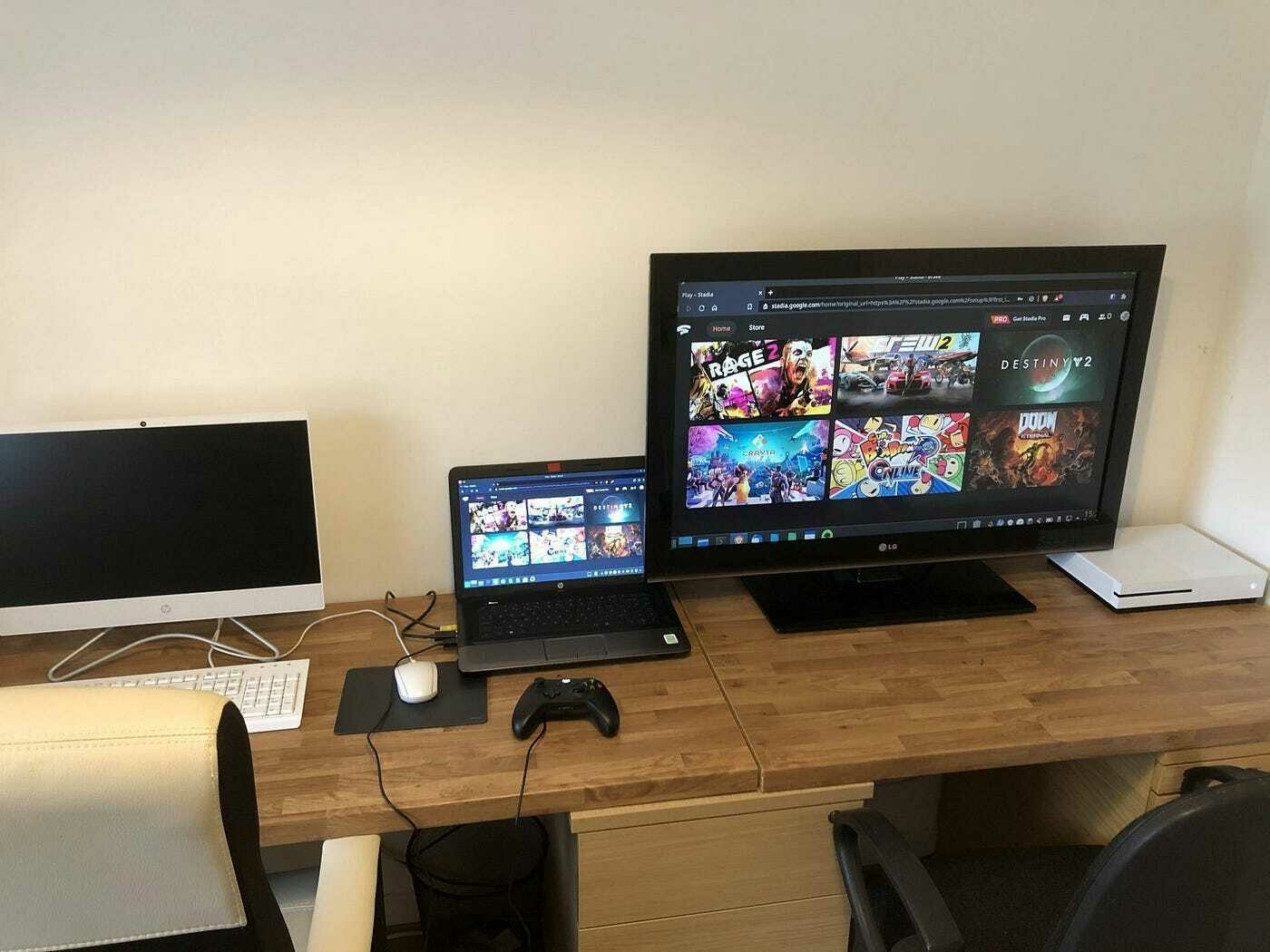
Moving forward
Quitting gaming is a difficult decision, but it is an important step to creating a better and more balanced lifestyle. From here on out, I will no longer let gaming control my life and my schedule. I have removed all games from my mobile devices, laptop and desktop PC.
The Xbox is staying because my son will use that for gaming with his friends. I genuinely don’t feel I will be tempted. To reinforce my new habit, I will be tracking it using Evernote. My time and energy will be channelled into activities that propel me forward and push me to reach my goals. It’s time to start making new memories and beginning new adventures.