
Reviews
- Thursday — 21/09
- 21/09/23 TH
- 2023–09–21 THU
- Journal — 21–09–2023
- A phrase to summarise the day with an emoji for my mood
- Community
- Sharing / Collaborating
- Home page
- Coins
- Profiles
- Graph view — The Universe
- Publishing to Twos World
- Keyboard shortcuts
- Complete the onboarding clues (click on Prestige to run through the process again).
- Complete daily clues, which involve actions taken in the onboarding experience.
- Post to Twos World to gain potential donations from other users.
- Join Twos competitions that offer coins as a reward.
- Encryption in transport.
- Encryption at rest.
- Password protection of notes (or folders)
- 2FA (coming to Twos)
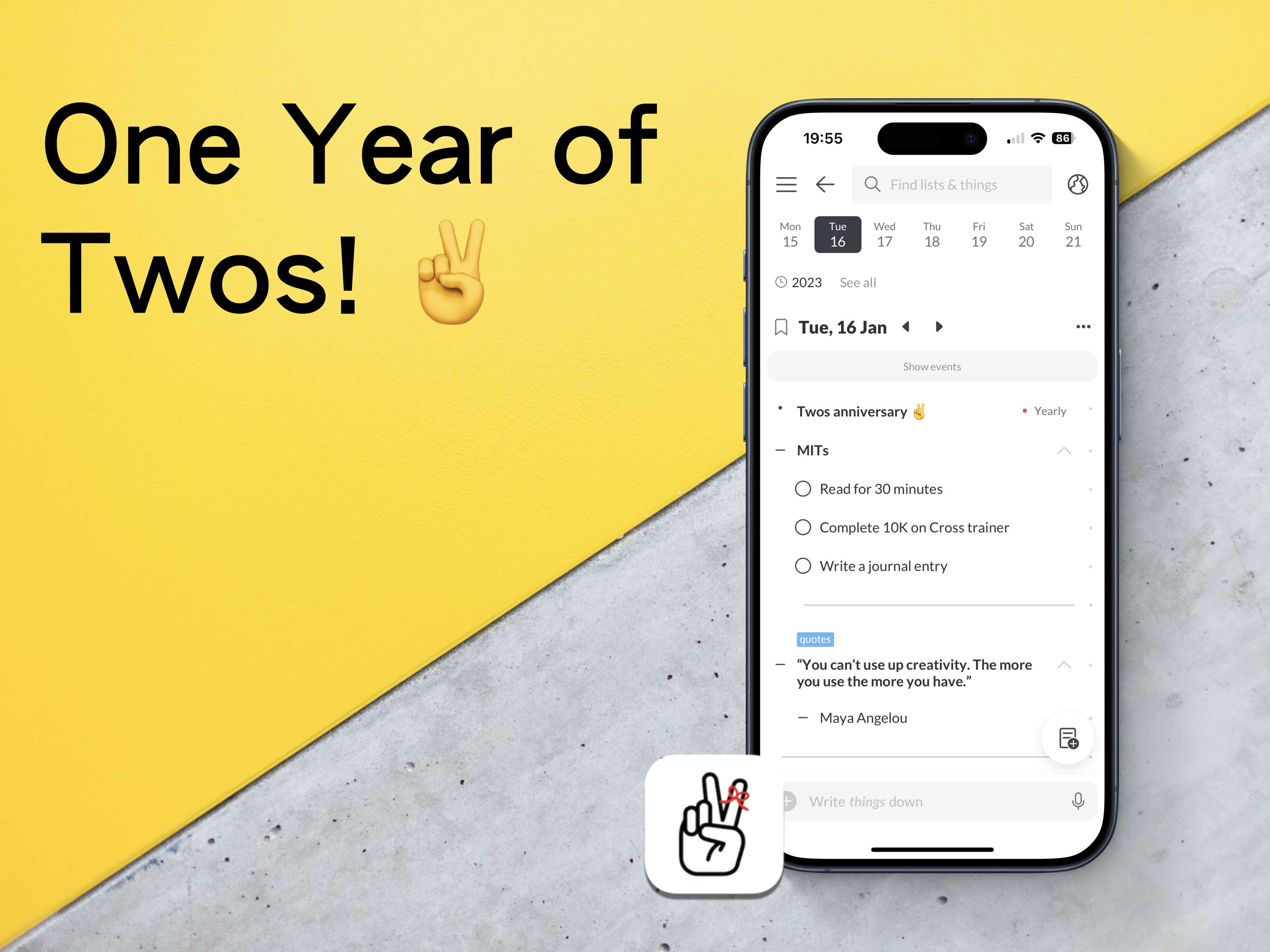
One Year of Twos!
A chance encounter with an app changed how I write things down.
I know I have mentioned this many times before, but I will briefly mention it again (briefly). At the start of 2023, I had a disastrous experience with a popular note-taking app, which meant losing an entire project for work. There was no way of recovering the data, and the app’s customer support had no way of recovering what I had lost either.
All I wanted was something to quickly capture ideas, thoughts, links, and tasks. To be honest, the app in question did not really do this. It just looked pretty. It also functioned like an old, dying elephant.🐘
I set out to find something better. Something that would work across all the different platforms I was using at the time. It had to be quick, enjoyable to use, clutter-free, and have a great community that wanted to help each other learn how to use the app.
I found such an app. It is called Twos!✌️
Imagine an app, a digital bullet journal of sorts, where you can add notes, tasks, events, link between notes, and share your information with others. Well, that is Twos. It is free with purchasable Pro features. However, you can earn in-app coins to purchase these pro features for free. Sign up with this referral link to receive 200 extra coins — https://www.TwosApp.com?code=codemaclife
First steps
I created an account, followed their onboarding instructions, explored the settings and played around with every feature it offered. I was greatly pleased with what I was experiencing. Dare I say, I was getting excitable. That was one year ago on the 16th January. Eight days after the regrettable events that had unfolded in the other app I was using.
I read a bit more about Twos. I wanted to see what people were saying the good, bad, and ugly about using Twos. I couldn’t find anything bad or ugly from the users, which made me sceptical. Furthermore, I was keen to explore to see if their claims of the being great were true or not. There must have been an hour or two dedicated to be reading the Discord channel and other comments across the internet. This was before I had written anything more than a task and one thing(things are each block of information in Twos).
I thought to myself — why don’t I just start using the app and learn the basics while I write things down in Twos?
Similar to bullet journaling, I wanted to start with keeping it simple. I know from working as an educator in England that getting a solid foundation of knowledge is key to building further skills.
I have no idea how long I spent in Twos on the first day, but I remember my phone’s battery went down to a single digit. I’m not one to spend a lot of time on my phone, and I don’t remember the time I have ever let my phone drop before 10%. Twos was mesmerising.
Now
Fast track to 365 days of using Twos. How has it gone?
It doesn’t take me long to figure out if an app will be the right fit for me. I have experienced a lot of them across three and a half decades of using computers. I’m confident to say I can make a verdict on an app within two hours. Many of them have the same features and a slightly different approach to aesthetics.
Twos is the first app in a long time when I haven’t thought about leaving. I expect I will be using Twos in five years time. Seriously, Twos, please don’t go anywhere! 🙏
I genuinely believe my experience of using a bullet journal and love for minimalism has influenced my unwavering admiration for Twos.
I work in a fast-paced environment. You wouldn’t think schools would be chaotic, but they are. I also have many responsibilities outside work, too. Being a father means I have to keep on top of my son’s busy, social schedule. There is a lot to process, mentally and physically. Don’t worry, though. Twos has my back.
The ten-month reset
Around ten months, I backed up my Twos data and deleted it all. I wasn’t planning to leave Twos. In fact, it was me thinking about how I was going to use Twos long-term.
Through trial and error, I tested all the different possible ways to use Twos. I mimicked approaches I had seen through the internet and Twos World (more on that later). There were a handful of systems I had previously used implemented in Twos. To be honest, my things in Twos were starting to look like a mess. I needed a new start.
With a blank slate, I create a list. It was called Twos — Part 2. Lists are like collections in bullet journaling. I sat down and thought about what I wanted my Twos system. In BuJo terms, I rapid-dashed ideas down as things in the list. Nothing more than five minutes and I had the ideal system for Twos.
I now have something that is easy to use, easier to maintain, and the easiest system I could possibly use in Twos.
Two features I use each day
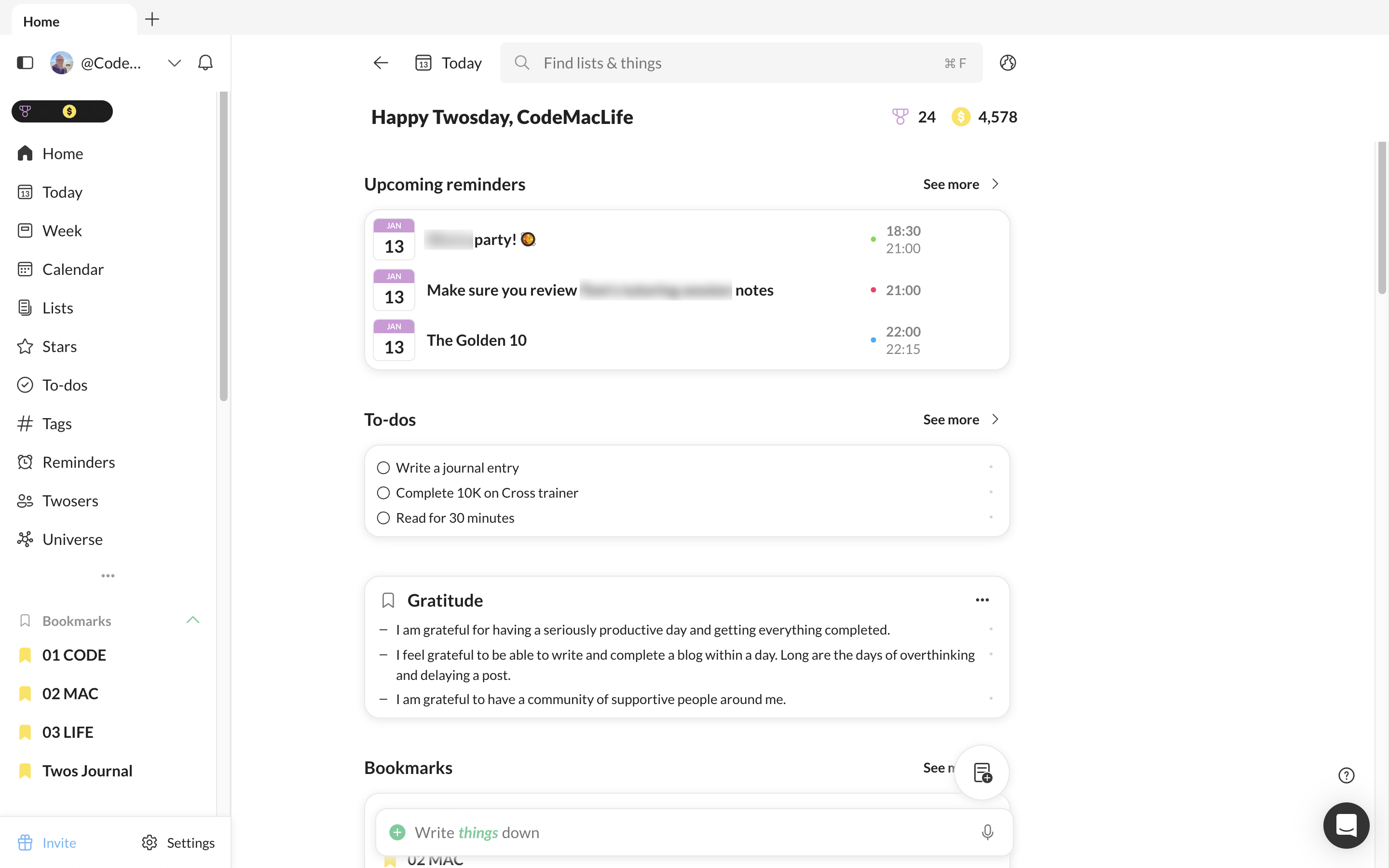
Home
I dismissed the home page for a while. I always had my Twos set up to go to the Today page. However, I thought about the areas I use the most and thought it would be better for me to set them up on the home page and enable Twos to go straight to the home page. The Today link is always available from there anyway.
I have upcoming events, tasks, a gratitude, and affirmations lists I add to each day as well as my week view. Tags, stars and recent are all available from the Home page, too.
Double tap entries via Apple Shortcuts
Whether I am reading an article, thinking of an idea or want to record something to expand later in the day, I can double tap the back of my phone to enable the Twos prompt. It allows me to quickly add a thing to my Today list. There is no need to open Twos and add to my Today page, enabling me to get back to what I am doing.
To achieve this, I used Apple Shortcuts to create a shortcut available for Twos. In Settings, I went into accessibility > Touch > Back Tap. You can choose from a list of phone features or one of your Apple Shortcut list.
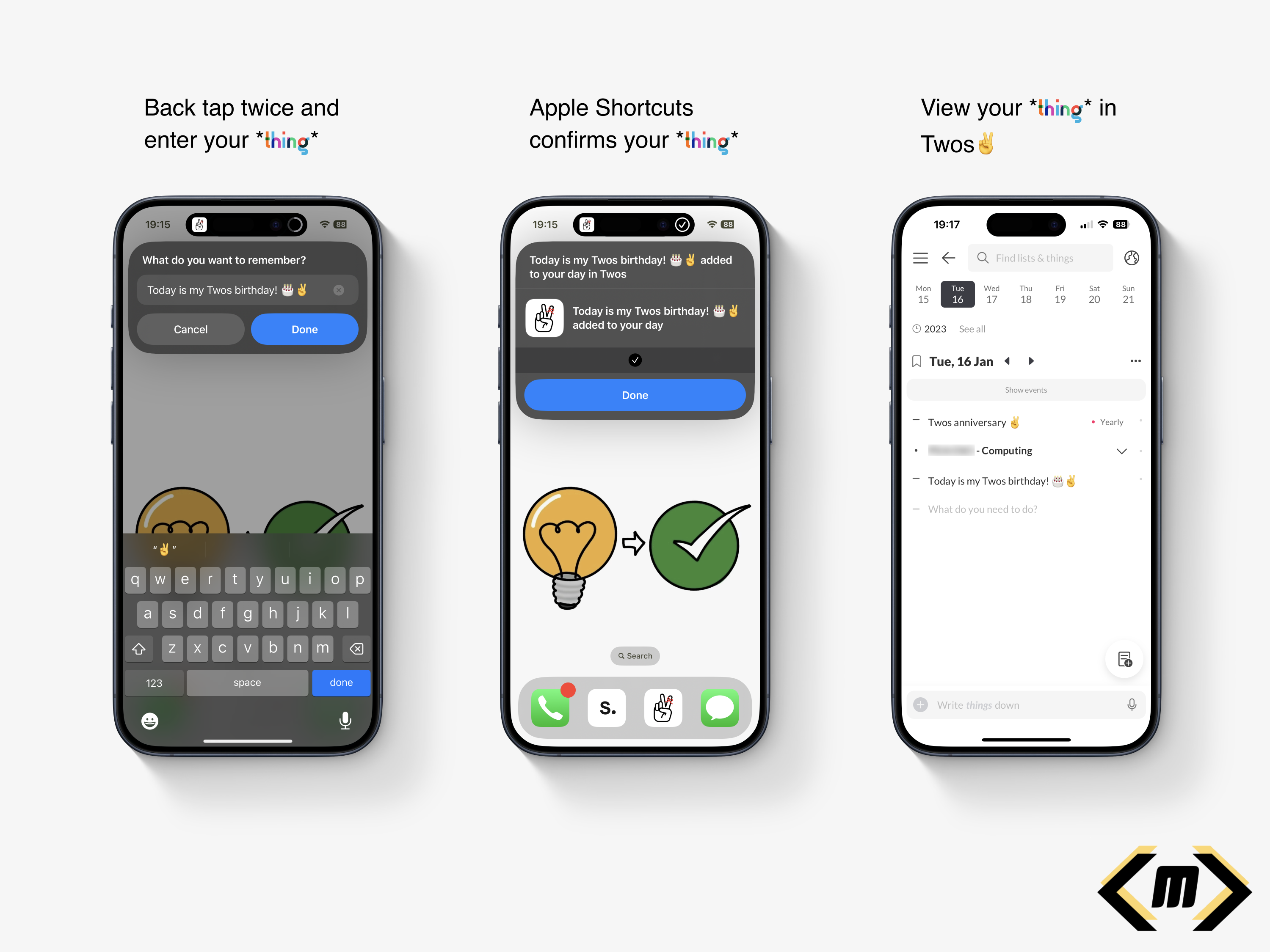
I feel my back tap method is a reason why I use Twos so much. It is quick, convenient and allows me to continue with what I am doing. There are distractions from Twos or any other app, just a simple prompt saying ‘What do you want to remember?’
Twos World
If you have no idea what Twos World is, here is my explanation and why I love accessing it each day.
Twos gets its name from the ability to record, privately or publicly. There are two options. As default, your tasks, events, links, photos, notes are private. Only you can see them. However, the second option opens up a whole new world of possibilities.
Twos World is where you can access, like and comment on the things and lists of others. It is a haven of knowledge, learning, quotes, and personal experiences. It is a positive social media-like experience. No negative vibes here. We are a community of individuals who want the best for each other.
A particular favourite of mine is book reviews/notes. I like how I can read the notes from a reader’s post. The summary, quotes, messages, and reflections make Twos the perfect book club. I have been inspired to buy the books myself. At the same time, I have seen the content and chosen not to pursue a purchase. My time and attention is valuable, meaning I can spend my efforts on a book I will take value from. Thank you, Twos community!
Sharing on Twos is like having your blog. To prove a point, this post is available on Twos to read. There’s no option to have a custom domain, but it is a great start to sharing your content online. Did I mention this is all free? No added subscriptions here!
Twos have come a long way
The Twos app I used one year ago is noticeably different to the Twos app I use now. A lot more useful features have been added to make Twos the perfect companion to use every day. Look at the Twos Roadmap to see what has been added and what is coming to the app.
Toggle headings have to be my favourite feature of all. I don’t necessarily want information in a new list, but I would like to be able to hide the content when I am viewing it on the Today page. By introducing the toggle feature, I was able to focus on the content that needed my attention without being hidden with an array of other information.
Talking about focus. Did you know Twos has a focus feature? It requires a bit of further polish, but it is great for those who want to time their activities. I like the Pomodoro technique because I struggle to focus for 25 minutes, or I spend too long on an activity.
To be honest, I could write a blog or two about the features of Twos. I have two already:
I created a list of the features from the roadmap I would like to see come out — here.
Features I would like to see come to Twos
Some features are not on the list above. I believe these would make great additions to Twos. I hope they would help others.
Twos Extension
Twos has an extension to quickly clip an article or website. I find it useful when I want to quickly capture the website without opening up Twos. Unfortunately, the extension is missing from Apple Safari for Mac. This is my primary browser. I would like to see the extension come out for Safari via the Apple Mac Store.
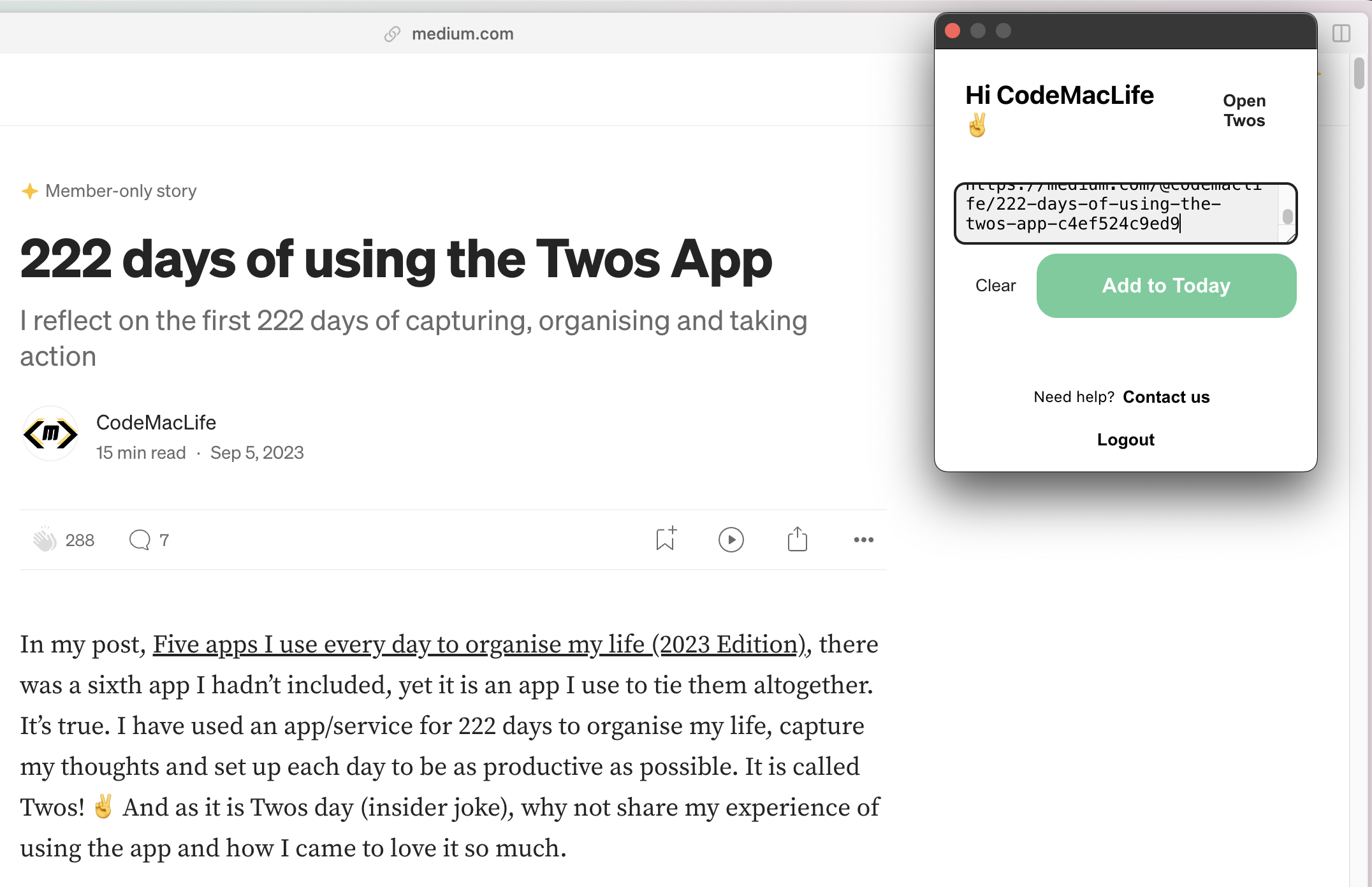
Another thing missing, and I believe, an option underneath the extension to add a comment about the bookmarked link. There have been times when I have bookmarked a link and then wondered why I had. I have no idea in what context I saved it. Twos is a tool for remembering, after all. I would expect the captured website to save as a toggled header, with comments about the website to be indented below. Having comments to with the content you save is useful for the future self.
Offline for desktop and web app
There are times when I purposely go offline to keep focus. Other times, I simply don’t have access to the internet. Twos works amazingly offline on the phone and tablet apps. However, I am yet to experience all of my content offline on the desktop.
I believe Twos needs a PWA experience with full access to your data when offline. I know how useful it was when I used Amplenote for six months. The desktop apps for Twos can be hit-and-miss. I can gain access to some lists and the Today page. Other lists hand with a message saying it is trying to receive the data.
I try to avoid using my phone, so the desktop is where I mostly use Twos. Safari is my main browser and Arc is my backup browser. If a PWA could be available for both, that would be great news.
2FA
I would like to see 2FA come to Twos. As I enter more information into the app, I would like to know I have an extra layer of protection for my data. I trust Twos with my information. Unfortunately, there are plenty of bad actors out on the internet who would like to gain access to user’s content. It also doesn’t look good for a company when their customer’s data is breached.
Backlinks
Already on the roadmap, backlinks is another feature I want to see. Linking words with two lists is a great way to link thoughts. Even better would be the ability to see how the lists are connected, with a toggle to see in what context the two lists are connected.
Finally — tiles on the Home page
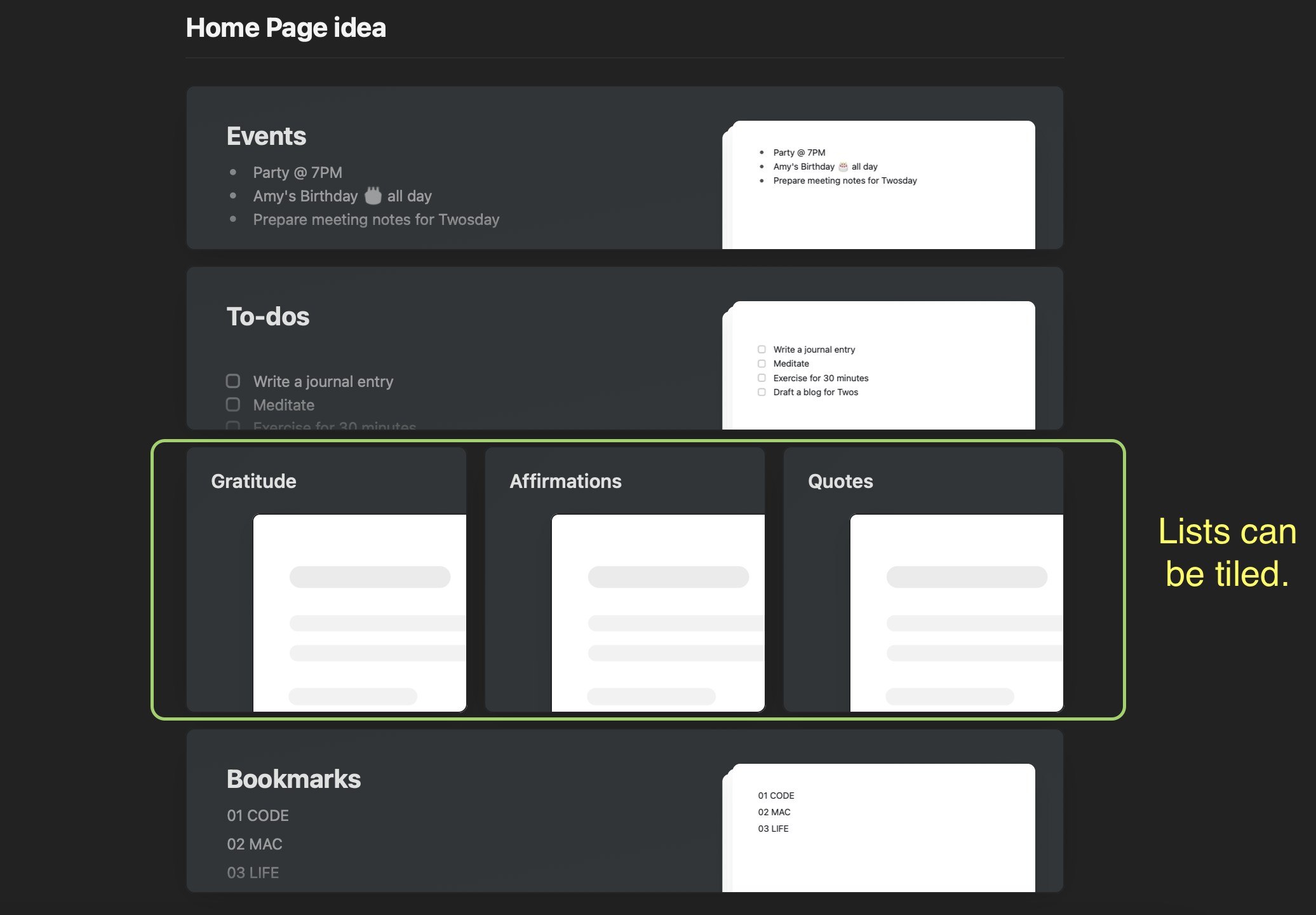
I have three linear lists on my Home page — gratitude, affirmations, and quotes. It would be great to see them tiled next to each other like they can in the Craft Docs app. It would save me having to scroll down to access the lists out of view. I’m not sure how that would look on the mobile screen. Maybe three smaller squares? In addition, it would have the option to hide the preview of the list’s content. The minimal look would be aesthetically pleasing.
Thank you, Twos✌️
I feel so lucky to have found Twos when I needed it. I can’t thank Parker, Joe, and others who worked on Twos, especially Nino’s design and feature ideas.
If you are interested in Twos, use my referral link to sign up — https://www.TwosApp.com?code=codemaclife
As always, thank you for reading my post.
Mark @ CodeMacLife
Follow me on Micro.Blog
Follow me on Mastodon (AllThingsTech)
Follow me on Medium
Follow me on X / Twitter
Follow me on Tumblr
Email me at connect@codemaclife.net
Using Apple’s Assistive Access feature to create the ultimate dumb phone experience
Using Apple’s Assistive Access feature to create the ultimate dumb phone experience
How iOS 17’s new feature can help you reclaim your focus
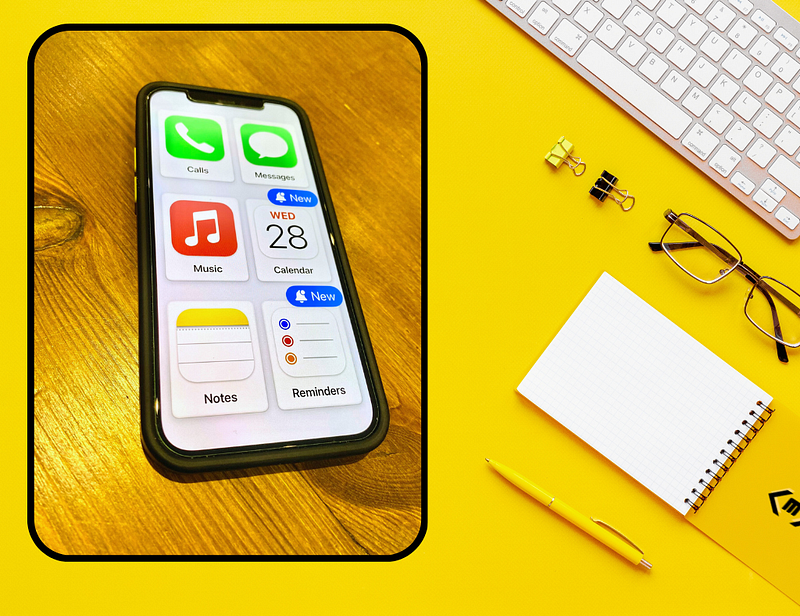
There’s one feature in Apple’s new iOS 17 update that is probably overlooked. It is called Assistive Access. In Apple’s own words:
Assistive Access is a distinctive iOS experience, with more focused features and a simplified user interface, which allows people with cognitive disabilities to use iPhone with greater ease and independence.
I first saw this previewed on X (Twitter) by MrNoble who shared images of the (then) rumoured feature. I thought it would be a good idea for those who want a simplified phone experience. Similar offerings have been made by Google and Samsung. I had previously modified my Android phone around Square Home launcher and Blloc Ratio launcher (my favourite user interface of all time) to achieve the same result.
Assistive Access allows you to choose up to six apps on your phone and display them as large square blocks or horizontal bars. Since the iOS 17.0.2 update, more apps can be added. Additional access to the app’s abilities need permission confirmation. For example, you will be asked if the app can have access to location, photos, contacts, etc.
Once setup has been completed, the iPhone will reboot into Assistive Access mode. Features like swiping down for notifications and command centre are inaccessible. Big text. Big buttons. Basic access. You are left with a dumbed down phone experience.
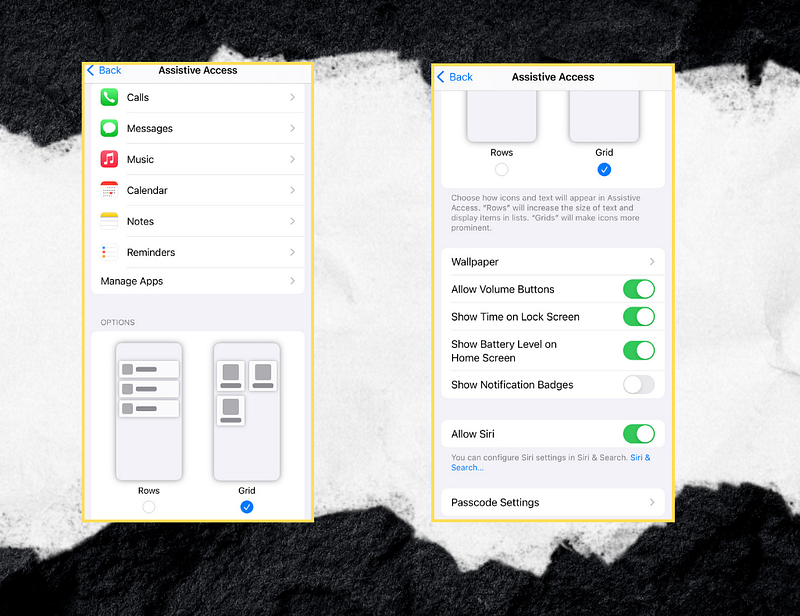
How do you access Assistive Access?
Go to Settings > Accessibility > Assistive Access (under General).
From here you can configure up to six apps, decide rows or grid for the UI, choose a wallpaper (see image for other settings).
To leave Assistive Access, triple-click your power button and enter the four-digit code, which you are asked to create.
You have to manually go to the settings page to enter Assistive Access. That’s why I selected to assign triple-clicking the power to enter into the feature. It makes the switching convenient and accessible.

My Two-day challenge
Originally, I thought it would be a good opportunity to see how Assistive Access would be a great experience to practice digital minimalism. The challenge was simple — spend two days in Assistive Access mode with only six apps available — Phone, iMessage, Apple Music, Calendar, Notes, and Reminders. I stated on X I would spend one day in this mode, but where’s the challenge in that? I opted for two days instead.
Day 1
Not the most eventful day. I found the lack of apps available made me use my phone less. I mostly accessed the music app on the way to work and Apple Notes to record a few ideas for an upcoming blog.
Not only that, but I noticed the apps ran at a slower pace like they were being run through an emulator. This is noticeable when turning the calendar app into landscape mode. There was a juddering, clunky animation experienced as it transitioned to presenting my calendar in the weekly view. I thought Apple would take more care with the quality of Assistive Access.
Another thing to be aware of is the enlarged menus and text. It’s nothing too concerning. After all, this is an accessibility feature. Apps like Apple Notes and iMessage look strangely unpolished. Too much of the screen real estate is cluttered with menus and formatting options. There’s very little area for the content to be shown.
I managed the first day with ease. I miss the simplicity of using a feature phone. However, I could quickly see why I saw the restrictiveness as a hindrance. The clumsy UI and oversized keyboard made sure I disliked using my apps. Due to my limited access to other apps, I finished the day on 68% battery life. There was no need to put my phone on charge because knew my phone could make through another day.
Day 2
The day didn’t go to plan. I found myself existing Assistive Access mode by 14:30. The reason? My place of work (a school) had received a phone call to be informed it would be facing a three-day inspection by an education agency called Ofsted (governing officials for school standards). Real work had to be done, and no way could Assistive Access mode cut it. The morning was fine in this mode, but now I had a lot of work to handle.
I switched back to ‘normal’ mode to get on with a plethora of tasks before the day ended. As much as I like the digital minimalist approach, I know smartphones offer, well, smartness. I could go through my tasks, events, and notes in preparation before I got home where I switched to my MacBook.
Drawbacks of using Assistive Access
Like I mentioned, with only six apps, you have to think carefully about what you choose. My choice was the closest I had to when I used a ‘dumb’ feature phone, as mentioned in a previous post. EDIT: You can add more apps. However, adding more apps would defeat the point of using Assistive Access for a digital minimalist approach. Less is more.
Even if you get messages in other apps like WhatsApp or Signal, you will not be notified of them. I had to pre-warn a few friends they would receive radio silence unless they messaged me through iMessage/SMS.
The trio of productivity, Apple Calendar, Notes and Reminders, worked like a charm to a certain degree. Even their oddly enlarged UI was somewhat user-friendly to operate. Take note: the Apple Calendar icon is not dynamic. It has a permanent date of WED 28. My screenshots were taken on 24th September.
I am uncertain whether this is a bug or not, but I was unable to configure my Twos app. During the process, Assistive Access asked for photo access to Twos. However, the confirm button was greyed out. There was no way of finishing the process with Twos. I settled with Apple Music, instead.
Final thoughts
Assistive Access is a great way to practice digital minimalism when you are feeling overwhelmed with information and distractions.
You will have a limited smartphone experience, but this is a good thing. You can refocus your attention on what truly matters in your life.
I suggest you try this mode if there is not much going on in your life, so you can see appreciate the benefits. In my experience, Assistive Access was not the right choice at a time when I had countless important jobs to do for work.
If you do attempt to use this approach, I would be happy to hear about your experience.
As always, what for you for taking the time to read my post.
Mark @ CodeMacLife
Follow me on X (Twitter)
Follow me on Medium
Email me at connect@codemaclife.net
100 Days of Day One journaling app | Reflection
100 Days of Day One journaling app | Reflection
Signing up to Day One made me journal consistently
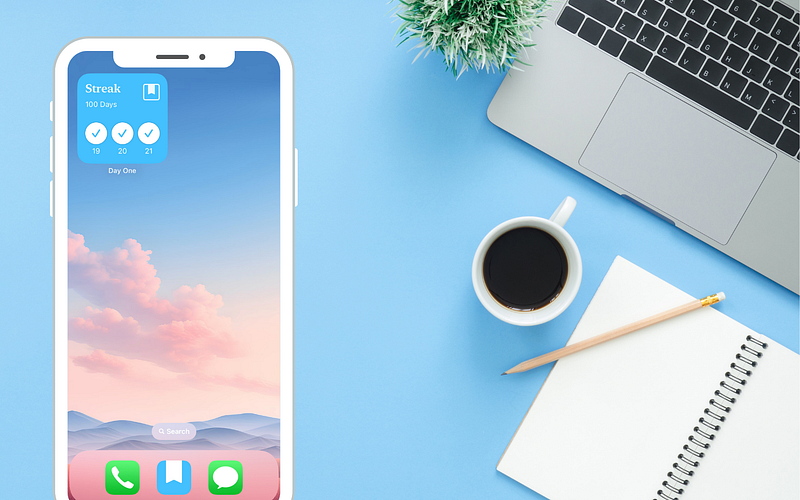
I love the idea of journaling. It was just an idea, and I never kept the act of journaling daily. That was until I signed up to the Day One app.
I had watched a dozen videos on Day One over the past four years, but it was a video by Carl Pullein that me think about why I should separate my journal from my note-taking app — Apple Notes.
Before Day One, I had dabbled with Craft Docs, Journey, Microsoft Word (don’t judge), Google Docs, Evernote, entries into my Google Calendar and eventually Apple Notes. None of them were ever consistent. I couldn’t find the flow or motivation to record my thoughts every day.
It wasn’t until I decided to start going back to my previous entries that I realised the power of reflecting on old memories, photos, and thoughts. I immediately felt grateful for writing things down. It was like I had a treasure trove of the past.
During my revisit, I spotted one thing that stuck out to me. The navigation and ease of searching through in chronological order was difficult to follow. I wouldn’t say it was the fault of the apps itself. Really, the way I had labelled them was a hinderance. I was inconsistent with the name convention. Here are a few of the naming conventions I used over the years.
As you can see, I had a confusing array of titles. This wasn’t apparent until I decided to amalgamate all the journal entries into one app. Even with my journaling inconsistency, I had over 1000 entries. No way was I going to rename them all with the same naming convention.
“As a writer you should not judge. You should understand.” — Ernest Hemingway
The capture shift
I didn’t want the hassle of deciding how I was doing to title my journal entries. I started to explore options by looking online at what others were sharing on social media. Some looked good. Some were confusing with the date formatting (US date format is different to the UK’s approach). Then, I saw the video by Carl Pullein showing off how he used Day One. The dating method was done automatically in a stylistic way.
I didn’t dawn to me to go to Day One immediately. I looked at a host of journaling apps because I wanted to look at the options. Eventually, I went to Day One’s website and started to explore what it had to offer. I was impressed.
Dare I say, I was in awe of the features on offer.
Making the switch
Further research and five more videos later, I signed up to Day One journaling app. They offered a one-month trial of their service. It only took two weeks for me to decide the Day One app was the right fit for me. I continued with the trial and subscribed to Day One on the last day. The £32.99 annual subscription was reasonable for what features I was interested in — E2EE, cross-platform support, access via web, app lock protection, daily prompts, audio capture, Apple Watch app, templates, and handwritten entries for my iPad.
It has been 100 days since I chose to switch to Day One journal. It was the best thing I could have done to make my journaling a successful habit. I believe the daily prompts to write pinging on my Apple Watch is a reason for my consistency. Even on the days I don’t feel like writing, I take the time to record something, including the option to input through the audio capture feature.
The surprising feature I thought I would never use is actually one I use most frequently with Day One. I capture entries on my Apple Watch when I am not close to my phone or computer. There are two options — write an entry or record audio. Both are great tools for those on the go. I just wish the audio recording had a transcribing tool because it would be nice to have both text and audio in the same entry.
Another cool feature is the daily prompt. Each day, a different question appears in Day One. I find these to be thought-provoking. I try my best to give lengthy responses because I know in a year’s time I will read what I have recorded. Some questions throw me because I struggle to find positives in myself. For example, one question was — What are some of your strengths? I’m not going to give you the response, but you can see how the app makes you mindful of who you are as a person.
I won’t feel the real impact of Day One until I have used the app for over a year. Day One has an impressive widget and section in the side panel called On This Day. It presents you with journal entries from a year ago. Like I mentioned earlier, revisiting old journal entries is special.

Stepping back in time shows you what was most important in your life. I’m excited to be reminded of the wonderful summer holiday I had with my family. The photos and descriptions had a lot of thought put into them. I’m also interested to see how I react to my daily prompts. Will I still feel the say way?
Looking to the future
My next post on Day One will come when I have completed 365 days of using the service. I know that time will fly by, as does everything else in my life right now.
The frictionless journaling of Day One has made it a pleasure to use each day.
Even on the days when I struggle to write something down, I can always use one of the templates available. I can always use Day One’s blog if I need a dose of inspiration.
As always, thank you for taking the time to read my post.
Mark @ CodeMacLife
Follow me on X (Twitter)
Follow me on Medium
Email me at connect@codemaclife.net
222 days of using the Twos App
222 days of using the Twos App
I reflect on the first 222 days of capturing, organising and taking action
In my post, Five apps I use every day to organise my life (2023 Edition), there was a sixth app I hadn’t included, yet it is an app I use to tie them altogether. It’s true. I have used an app/service for 222 days to organise my life, capture my thoughts and set up each day to be as productive as possible. It is called Twos! ✌️ And as it is Twos day (insider joke), why not share my experience of using the app and how I came to love it so much.
At the start of 2023, I had a significant setback when Evernote on my iPhone had a synchronisation problem. I lost so much valuable information from notes. This is after declaring my ambition to use Evernote exclusively for a year. What a just mistake. I needed something that would let me quickly capturing my thoughts, ideas and important information with speed and accuracy. Something that was as simple as it was to record in my bullet journal. Could such an application out there exist?
I spent out hours looking at what was out there over the weekend. There were too many trade-offs, and as much as I don’t like to admit, I wanted something that was going to be cost-effective (not necessarily free). I was starting to lose hope, and then I questioned myself — why do I like the bullet journal so much? I like the fact I can write something down and go back to it later on without the friction.
Other than losing my information, Evernote was actually poorly designed for quick capture. I used the scratchpad mostly, but the time it took to launch my web browser on my Chromebook at the time, find the scratchpad, and start writing, I would usually forget what I wanted to record. My memory isn’t that bad. However, the series of processes to get there was enough to lose my trail of thought.
So, I started searching for something that resembled a bullet journal. I knew how confident I was using the bullet journal since I had used it for the past three years. I continued searching. This time I used the words ‘bullet journal apps’ across YouTube, X (Twitter), Google Search. It was actually X that gave me hope. I was seeing some flashy posts with stats. Out of curiosity, I clicked on one by Michael. A Gregory. I believe it took less than ten minutes from accessing Twos’ website, reviewing the features, comments, I was up and running with Twos.
As stated in my original impressions post, I was looking for something that offered cross-platform with web access, and quick capture for my short-form notes. Twos were offering the ability to combine my notes, calendar, to-dos, reminders, lists and journaling all in one place. Twos ticked so many boxes.
Twos goes for simplicity, which is why I enjoy the app. It is trying to do many things, but without the bloat. I was hoping it would become the ‘everything’ app like Evernote tried to because this would cause unnecessary bloat.
“If my daily apps were a tree, Twos would be the trunk that grounds me and brings growth to my day, branching out to new possibilities.”
The Twos App is the bread and butter of my day. I have to juggle so much information and tasks at home and at work throughout the day. With so much information, I need to remember, take action on and plan ahead with it. Twos gives me the ability to simply write what I need down. Just like my bullet journal, I can quickly record what I need to write down and act when I need to. I can add things using my voice as well as through Siri. Twos receives plenty of updates. It has changed significantly since signing up and more features such as AI integration have appeared over the previous few months. Twos is a serious player in the productivity sector.
I use Apple Calendar, Reminders and Notes as my primary tools because my family uses the same. From these apps, I can pull the most important information into Twos, so I am able to see what I have on. It’s a methodical approach, but it works so well for me.
It works the other way, too. As I go through the day, I am capturing information, ideas, tasks, events, and new projects. I am no longer having to gather material from different places. I simply look in Twos and choose where it needs to go. Events in my calendar, larger tasks in my to-do list manager, and key information in my notes app. It is essentially my digital bullet journal.
Just like a bullet journal, you will have people who keep their setup simple (like me) or others who will make it complex or beautiful. Twos gives you the opportunity to customise it to your liking.
What does Twos offer?
Writing this post is probably one of the most challenging I have ever had to write because Twos does so much. I could never get everything into one post. It would end up resembling a book than a blog. I’ve decided to write about the features I wanted to write about in my first post.
Community (plus Twos World)
I believe here is where Twos really shines. I mean, it is called Twos for a reason — writing things down for personal and social things. In Twos, you have your private information. You can record what you want, and it is yours, privately. Then, there’s the other side — you can share things with others in the Twos World or with others who are not on the platform via your URL. Twos World, a social platform in itself, has likes and comments. The comments are new, and I like how it has made Twos more engaging. I wish they had a @ feature, so I could directly thank people for coins given to me through the posts I put on there.
The sharing feature has come a long way since I signed up. Originally, you could create a list and share that list. Lists are a collection of information, like a Post-It note. Now can share individual things (single lines of text), including photos, links, or templates. You could actually start your own microblog on Twos if you wanted to.
The community is wonderful and supportive. People share their experiences online, through social media and the app’s official Discord server. The Discord server is active, lively, and helpful when you get stuck with a particular problem. Upcoming live YouTube events, competitions, and features get shared on Discord. I would highly recommend signing up to their server to keep up to date with what is happening. It is also a great opportunity to meet others in the Twos community. Like I said, everyone is friendly, so you will always find the support you need.
Twos has a presence on X.com because users of Twos want to show what they have created on Twos. Again, you can quickly write something down, share it, and post it without the expensive fees associated with running your own website.
When all the support through Twos World, Twitter (sorry, X) and Discord isn’t enough, you can book a personal demo with Parker or Joe, who will guide you through Twos. I’ve been fortunate to speak to them both (they are awesome and super friendly).
Sharing / Collaborating
As mentioned above, you can share anything you have recorded on Twos. Be careful though, I have, on a few occasions, accidentally shared my information publicly without realising I had. At least it was nothing too personal. 😂
What you do with your shared information is completely up to you. You might want to share it with a friend, colleague, social media site, or even copy to a note-taking application as a point of reference. I often do this with blogging ideas. My past 20 posts on Medium have come from lists I created in Twos. That’s right. You could use Twos as your personal content manager.
I would like to take it clear now that there is a difference between sharing a link and sharing on Twos World. If you click on a list’s three dots, you can copy the link for personal use or click on publish to share with everyone on Twos World. Twos lets you share your content via text, PDF, markdown, or plaintext. I find this handy when I want to copy it to another app. You can also export everything as text or markdown (MD). It does not support the option to export your images, I’m afraid.
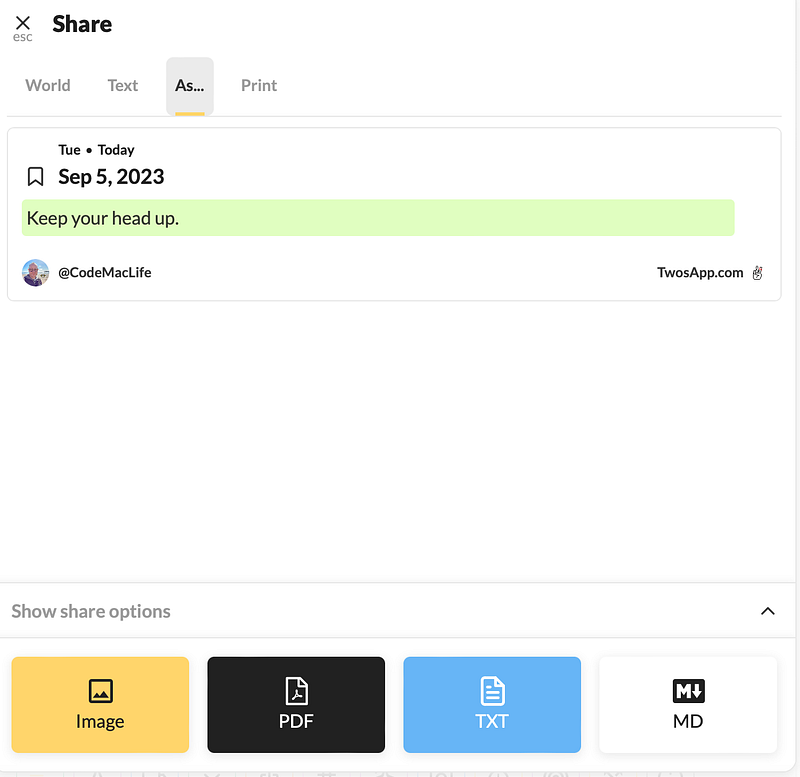
There is another option available — collaboration. The feature is pretty powerful. You can work on a list with another Twos user. You could work on a project with someone else and only you two can see it. Any changes will cause Twos to notify you of the changes, so you are aware of what is going on. A personal example of this was an upcoming holiday that needed planning. My son and I were able to collect a list of activities we wanted to do on our recent trip away. Any tasks that were on the list could be ticked off during the process. As we completed the activity on holiday, we ticked it off. It’s too easy (or should that be twos easy).
Home page
You can choose to load each day on Twos with a day view (simply known as Today) or a home page with essential information you have curated. Think of the home page as a digital dashboard into your life. This is a place where you can have a peak of your weekly calendar, to-dos, bookmarks, upcoming events, starred things, tags, and even add a list you have made for quick access.

On the left of any text, you have the option to add a star to that information. I only use stars for information I need to take action on within the week. By the end of Sunday, those starred items should have been dealt with or moved to another location, such as my calendar or to-do list manager. Occasionally, I simply like to star on an inspirational quote or information I need to refer to quickly. For me, I use these sparingly, so they do not lose their uniqueness.
Coins (unlock Pro features for free / gifting others)
Coins are an in-app currency that is used to purchase Pro features (on mobile), donate to other Twosers as well as rank up on the Twos leaderboard. When you sign up on Twos, you are given 200 coins when you join. These coins can be used to redeem pro features such as AI, templates, bookmarks, link previews, custom colours, focus timer, and so on. To gain other pro features for free, you need to earn additional coins. Alternatively, you can pay $2 per feature.
How to gain coins:
Not only can you gain coins, you can donate coins to others, which is a great feeling. I should have over 15,000 coins by now, but I like to save up and donate them to other users who have posted their content on Twos World.
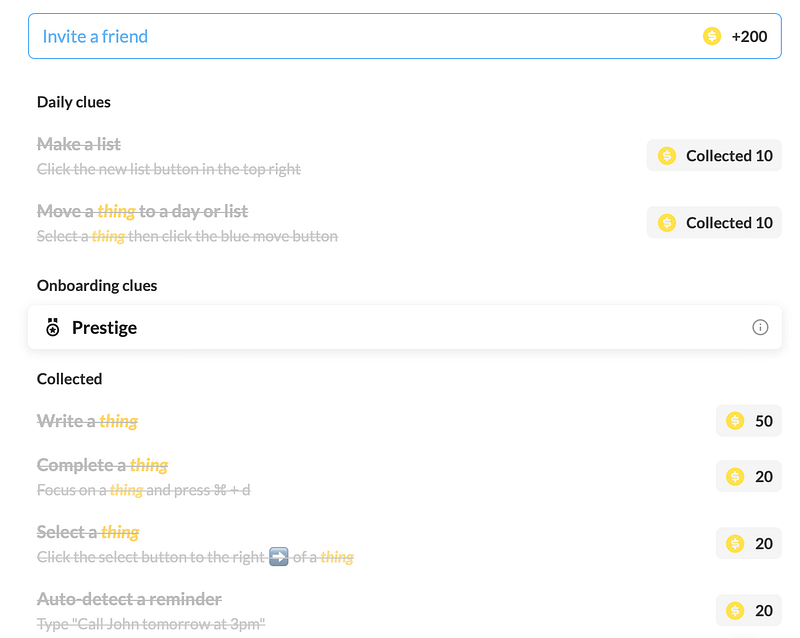
How did I get so many coins? I was able to get them through referring others to Twos. For example, if you want to try out Twos yourself, you can click on this link (https://www.TwosApp.com?code=codemaclife) and sign up with it. What happens is you will get an additional 200 coins on top of the coins for joining, and I will get 200 coins, too. It’s a win-win. I have 56 people who have used my code codemaclife to take advantage of this neat little incentive. Once you start to get other users onto Twos, your referral rate and coins will shoot up. On the leaderboard, you will see who has the most coins, referrals, and amount of Prestige. I like this type of gamification going on. I just wish it was able to sort the columns into ascending and descending order.
Profiles
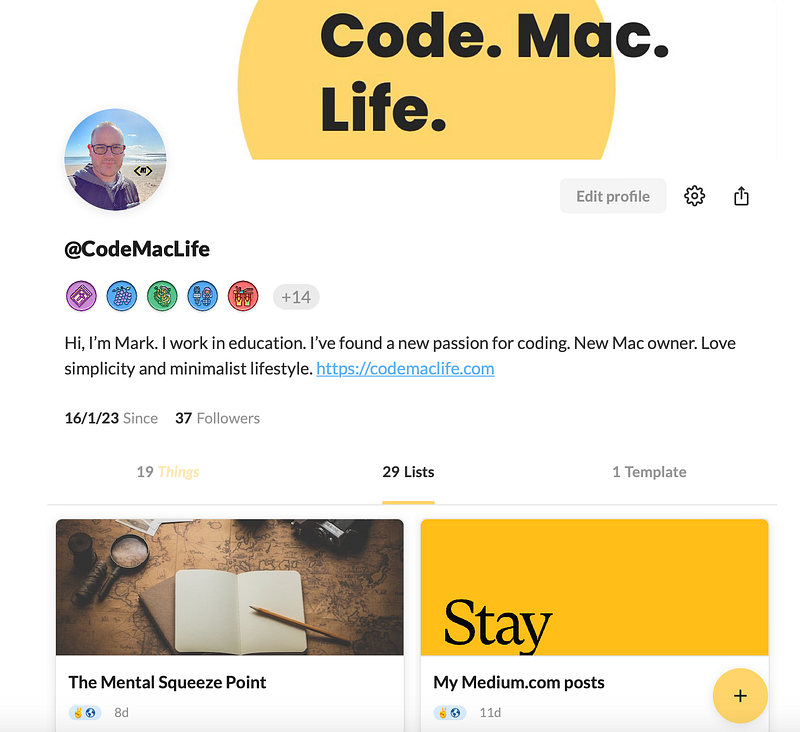
Profiles are essentially a place for your bio, achievements, followers, and shared content. Think of it like any social media platform out there. I like this area because I can see what I have shared with others. I don’t look at the achievements (milestones) in Twos, to be honest. The profile of others can be accessed by clicking on their name, allowing you to see their bio as well as what they have shared in Twos.
For me, this is a great place to see what others have created in Twos for inspiration. Templates are a new feature to the app. You can search a user’s profile to see what templates they have shared and make a copy of it for your use. Not to your taste? You can modify them for your needs.
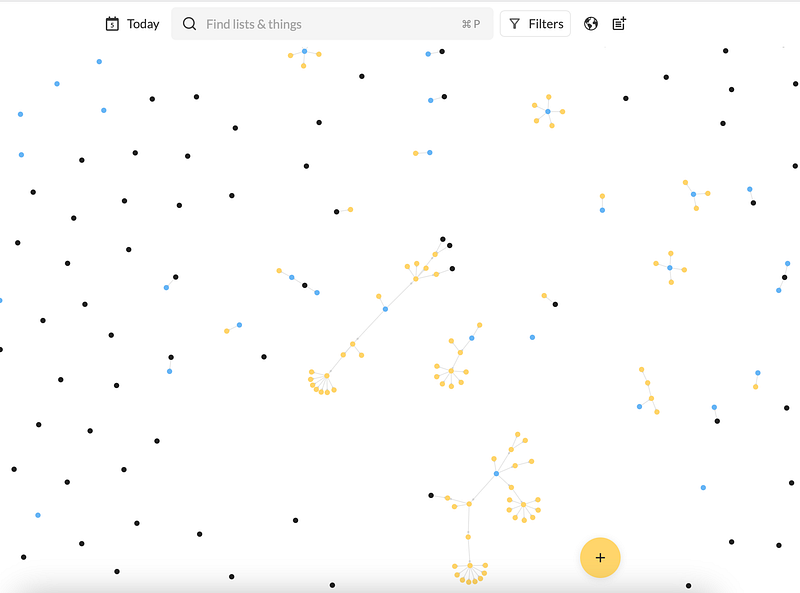
Universe (Graph view)
Networked note-taking is a popular approach to connecting our thoughts. Popular apps such as Roam, Obsidian and Reflect use this idea to show users how their thoughts are connected to one another. I used to think it was a gimmick. However, I learnt how to utilise the feature and see how my notes are connected.
I ignored this feature of Twos, but I have started to use it more in the past month since I started connecting my lists together. Instead of searching for a list, I will call the list into my current Today page. This will automatically join the two lists together in Universe, allowing me to see what days I wanted to have access to my lists. A list within another list is called a sublist in Twos. I’m sure I will explore the feature in greater depth over the coming months.
Keyboard shortcuts
If you are happy with clicking or swiping away to get the job done, that is absolutely fine. Twos is flexible like that. However, if you are like me, my hand rarely reaches for the mouse. Twos has keyboard shortcuts to achieve nearly everything in the app. I find this super useful when I am in the flow. To access the keyboard shortcut menu, click on the Twos logo on the bottom left-hand side and select Keyboard Shortcuts from the menu to find what keybindings are available.
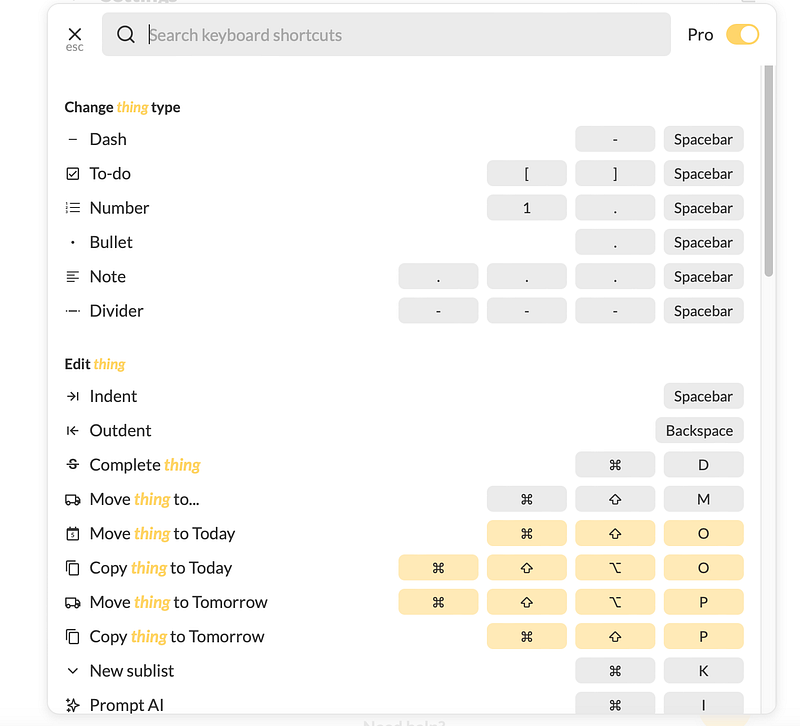
As illustrated by the image above, there’s a Pro slider at the top. You can select that to see advance key bindings, which allow you to operate some of the Twos’ advance features. I recommend you get comfortable with the basis first.
Any drawbacks?
I have mentioned some great things (get it) about Twos. Surely, there are some cons to using Twos? There are some. These are more personal preferences than actual issues with the software itself.
Security
Twos encrypts data in transit, meaning your data is protected against interception from hackers between client-server transactions. It is encrypted at rest with AES256-CBC (or 256-bit Advanced Encryption Standard in Cipher Block Chaining mode) via OpenSSL. It’s a standard database encryption protocol, as Parker informed me in the comments (see, the communication by the team is great).
Their privacy policy states ‘For all products, most data are not encrypted while they live in our database (since it needs to be ready to send to you when you need it), but we go to great lengths to secure your data at rest.
This allows Twos to quickly retrieve your information from their database, which is why Twos is effective at providing you the information you need whenever you need it.
Personally, I have developed a habit of using note-taking software that offers three features:
It would be lovely to say I will only use software that is End-to-end encrypted (E2EE), but in reality, there’s not much choice out there and the offering is pretty limiting. Not to mention, the feature limitations imposed on software that chooses to use E2EE.
The problem I see with Twos not having E2EE, is I would not put anything sensitive in Twos like my journaling, passwords, security information, personal identifiable documentation like passports or driving licence details. It has nothing to do with Twos itself. It is a security principle I apply across everything I use to protect myself against bad actors like hackers, poor government legislation and those who want to damage to a brand/product.
There’s always bad actors out there who could try to access the servers. I’m sure they would get bored after reading some of my content, though. 😂
If you’re wondering where the information is stored for the information mentioned above? I use a combination of Day One and Bitwarden, but I’m not saying what I use for which information… for security purposes, clearly.
Calendars
I’ve had a few issues with the calendar integration in the past. Ranging from events disappearing from my calendar to duplication. Most of the problems have been resolved.
I chose to keep one calendar synchronised in Twos. It is called iTasks, which copies my Twos app reminders into my Apple iCloud calendar. When I look at my Apple Calendar, I know the red events have come from Twos.
When I need to share the event with my wife and son, I will simply change the calendar from iTasks to the family calendar. I have found the ability to create calendar entries in Twos to be quicker than making the event in Apple Calendar.
App changes
As mentioned above, Twos receives numerous updates. The updates fix, adjusts or add new features. With each new addition or fix, cosmetic changes come with it. For someone who likes consistency, I am not a fan of the constant changes. The Twos I signed up to 222 days ago looks substantially different from the app I use today. The settings are different, new buttons have been added, features have been adjusted, and so on (see Twos’ change log for full details). You might like the amount of new features added to the app at the rate they do. The team are proactive with their development.
You will be wondering why this is an issue. Surely, an active team who constantly develops their products is a great thing? It is to a degree.
I take issue with not being able to find things (not Twos things) where I knew they were previously. I like consistency and predictability. The development of the appearance and features in Twos adds more friction than I would like. I don’t feel it is an app like Apple Notes or Upnote where most of the feature set or appearance remains untouched. They’re predictable and boring. I like that. My life is constantly running at a high pace with home, work (education), family and friends, etc. I want my collection of apps to be one consistent in my life, unlike everything else.
The best place to find out what is happening with Twos and how to use it would be their Discord channel, followed by their YouTube channel. If you like, you can follow Joe and Parker on Twos World, where they share new features and upcoming teasers.
What would I improve?
I would focus less on new features, and more on performance, especially with returning results from search. The search capabilities are great. However, I have found on several occasions that search is slow. Often to the point I think the search returns nothing. I thought it was the app. Upon investigation, the web client does the same. It doesn’t happen all the time, but it will happen at some point in the week.
I believe an update for images is coming out. This is good as image rendering has not been the smoothest in my opinion. I usually don’t bother with images in Twos. I use it for writing things down, just like it says on the tin (or at least, their website). I am uncertain if it is technically possible, but OCR capabilities would be a great feature to have. I enjoy writing with pen and paper, too. If I could scan my writing in (or take a photo) and Twos used its search to find the handwritten notes, that would be remarkable!
Final thoughts
Twos is a great app. You can use it across multiple platforms, including Linux. Their Chrome extension is good for quickly bookmarking a website into your Today page. I mostly use the web browser to access Twos, but there is an app if you prefer that. The app on iOS and Android runs smoothly with no noticeable lag. I appreciate the speed because I need to quickly record what I am thinking without any friction in the process.
Parker and Joe are great guys, who are approachable and supportive. Twos has made me value the difference great support offers to the user. I believe their support, with the community, is why I kept with Twos. Ask a question, and you will get an answer from someone quickly.
I strongly recommend Twos to anyone who is interested in building the habit of writing things down, and they want to be part of a growing community of like-minded people.
Use my link — https://www.TwosApp.com?code=codemaclife to get extra coins in the process.
Thank you for taking the time to read my post.
Mark @ CodeMacLife ✌️
Reflect Notes app | A Mini-review
Reflect Notes app | A Mini-review
Could Reflect be the best web app for productivity?
During my final week of the digital detox, I signed up for a 7-day free trial of Reflect to see if it was any good. I know I kept saying I wasn’t going to explore any more productivity/note-taking apps, but I was curious. Their website is gorgeous.

Here is a mini-review of what I have experienced in the first six days of using Reflect. From what I have used, all I can say is…
Wow. This is one seriously great application. It has E2EE, too! Reflect reminds me of Obsidian. The learning curve is not bad at all because I have used so many services out there. The extension is spectacular. I can easily clip tweets, parts of a website, and it even pulls in my Kindle book collection with highlights and comments. I was impressed, to say the least.

The only issue I noticed what the Kindle entries did not have location numbers next to highlights. I don’t find this to be an issue, but I can imagine some people would find this annoying. I believe there is a way of importing Readwise data. However, I don’t use that service, so I can’t say if it works or not.
Finally, the Whisper AI feature for transcription is the best I have ever used for dictating my ideas and thoughts. This is miles better than asking Siri (anything beats Siri).
Reflect can appear as pricey ($120 for the year). I guess it is worth it when you think about the features, E2EE sync, publishing, calendar integration, an extension, and a whole list of other little details it includes. If I was going to use Obsidian again (I’m not), I would have to buy the sync and publishing options at $192 per year, so Reflect is actually a great deal.

It’s not an outliner
When I looked at the website (and other websites), I thought the app was an outliner like Logseq. That’s not necessarily the case. The daily notes, a starting point for each day, offers an outliner to start recording. I was quick to discover I can treat the daily notes and new notes like a traditional note-taking app. I love the backlinking that appears at the bottom of each note. Tracing back to previous entries is something I have come to appreciate. I miss it when I am using Apple Notes.
It works offline!
One thing that I don’t get is the fact that their download page shows the application as an Apple-centric service. I have had this app on my radar for some time now, but I never tried it because I was using a Chromebook / Windows PC at the time. Now, I am all in with the Apple ecosystem. However, you can use it through a web browser. You are getting something like Obsidian, but it can be accessed through a web browser. How cool is that?
So when the home page of Reflect mentioned offline, I thought that was for the Apple apps. Nope. You can install Reflect as a PWA, and it works offline through the web browser! Mind blown — seriously. This changes everything. I thought Amplenote was the only PWA offline app out there. Just think — you could have web access to a networking note-taking app, similar to Obsidian, at work.

It has AI!
Reflect uses GPT-4. I’ve only used it a few times. What I have used has worked as expected. I’m new to AI. I am learning as I go along, so the YouTube videos presented by Sam Claasen have helped me understand how AI can enhance my productivity. One AI feature I like the most creates backlinks automatically.
Reliable
The message that comes across from Alex MacCaw and through the Discord server is the focus on reliability. I can see that. The Mac and web app are fast, reliable, and easy to navigate. Even if the iPhone and iPad (Beta) are not in the App Store, they perform exceptionally well.
Again, the Whisper AI for transcription is available. I like having the lock screen widget accessible, so I can conveniently record an idea down with as little friction as possible. When I access my daily note, an outliner point called Audio memos appears. I am able to view all my memos, in written form, and I can decide where I want to put them.
Final thoughts
Overall, I love Reflect. It is an app I would seriously consider buying into. There is so much going on. Maybe 7-days is too short of a time to truly test an application. Perhaps 14 days would be more sufficient? Tomorrow, I will get to test if Reflect is accessible in my workplace. You know how firewalls can be a pain to anyone’s intentions.
Is $120 too expensive for the service? I don’t think so. You are getting a quality application with a lot of functionality. I haven’t covered everything the app can do. It’s meant to be a mini-review, after all.
As always, thank you for reading my post.
Mark @ CodeMacLife